Network Configuration Considerations
Networking for the VMO use case requires extra care compared to a regular Kubernetes cluster. In most cases, VMs need to be accessible on existing VLANs. Accessing existing VLANs requires bypassing the typical Kubernetes pod networking stack.
PaletteAI VM Launchpad runs Cilium as the Kubernetes CNI for pod networking. To place VMs on existing VLANs, the
appliance uses the Multus Bridge network type, which attaches VMs to a bridge interface (br0) on the host. This gives
VMs direct access to the physical network and its VLANs, and requires specific host network setup on the Kubernetes
worker nodes.
Supported Configurations
VM Launchpad supports two host network configurations. Storage architecture drives which one fits your deployment.
-
Four NICs, two bonds. Two NICs bonded for management and Kubernetes cluster traffic, and two NICs bonded for VM data traffic. This is the recommended configuration for production deployments and works with hyper-converged storage, external iSCSI storage, or Fiber Channel storage.
-
Two NICs, one bond, plus two Fiber Channel (FC) storage adapters. Two NICs bonded to carry management, cluster, and VM data traffic, with two Fiber Channel adapters dedicated to storage. This configuration is only viable when the servers have FC storage adapters, because storage I/O offloads to those adapters and does not consume NIC bandwidth.
Alternative host network configurations may work, but Spectro Cloud does not test or support them.
Storage Considerations
The storage architecture determines the minimum viable NIC count.
-
Fiber Channel storage. Two NICs in one bond is sufficient because storage I/O offloads to the FC adapters.
-
External iSCSI storage. Dedicate two NICs (not bonded) to iSCSI traffic. Kubernetes and VM traffic can share the remaining bonded pair. Fully isolating Kubernetes cluster traffic from VM data traffic requires six NICs in total.
-
Hyper-converged storage. Four NICs is the minimum: two for VM data traffic, and two for combined Kubernetes and storage replication. Six NICs is preferred to isolate Kubernetes cluster traffic (including live migration) from storage replication.
The br0 Bridge
Every supported configuration includes a br0 bridge interface. The Multus Bridge network type requires br0 to
associate VLAN-bridged VM networks with. Reserve br0 for VM traffic. A dedicated bond for br0 is best, though br0
can share a bond with other traffic when NICs are limited.
Do not run the Kubernetes cluster itself on br0 or on any br0.xxx VLAN subinterface. Instead, run the Kubernetes
cluster on a VLAN sub-interface of the bond that carries br0. This separation works even with only two NICs in a
single bond.
Cilium usually does not run on the bridge interface. Only run Cilium on the bridge in the specific case where no other option is available.
Review the following sections before installing VM Launchpad so that you can prepare your host network and switch port configuration.
Management and Cluster Traffic
VM Launchpad hosts can use separate network interfaces for management traffic and Kubernetes cluster traffic. Management traffic includes Local UI access, communication between hosts, and content synchronization.
You can configure the management interface in the Edge Installer user-data file. A selection made in the TUI overrides
the value from user-data. After initial setup, a selection made in Local UI overrides the value from the TUI. If you
do not select a management interface, the host uses the network interface associated with the default route.
Kubernetes cluster traffic uses the interface you select during cluster creation. Kubernetes cluster traffic includes node IP selection, Kubernetes control plane traffic, etcd traffic, and traffic for the cluster virtual IP address (VIP). For VM Launchpad, this is the interface selected in the Cilium and MetalLB interface field.
Selecting a management interface or a cluster traffic interface does not change how the host routes network traffic. If two or more adapters use the same subnet and each adapter has a default route, traffic may leave through a different adapter than expected. This behavior may prevent control plane nodes from successfully joining the cluster.
For best results, place management and cluster traffic on separate subnets and configure both interfaces explicitly.
Two NICs, One Bond Plus Two Fiber Channel Adapters
When network interfaces are limited, you can configure NICs with a single bond (bond0) and bridge (br0) that carry
many VLANs. This configuration requires two Fiber Channel adapters dedicated to storage. The following table and image
present one possible example.
| Interface | Type | Consisting of | VLAN | CIDR | Gateway |
|---|---|---|---|---|---|
bond0 | Bond (802.3ad) | enp1s0 enp2s0 | native | N/A | N/A |
bond0.10 | VLAN | bond0 | 10 | 172.16.0.0/22 | None |
bond0.20 | VLAN | bond0 | 20 | 10.20.30.0/16 | 10.20.30.1 |
br0 | Bridge | bond0 | native | N/A | N/A |
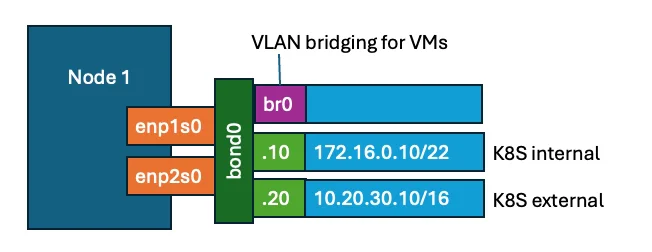
For this example, the physical servers network cards connect to the physical switch with the following configuration.
| Physical port | Name in OS | Purpose | Switch port config |
|---|---|---|---|
| NIC 1, Port 1 | enp1s0 | Management network and Data network | Trunk (allowing 0, 10, 20-100) |
| NIC 1, Port 2 | enp2s0 | Management network and Data network | Trunk (allowing 0, 10, 20-100) |
VMs connected to br0 cannot use VLAN 10 or VLAN 20 because the bond0.10 and bond0.20 subinterfaces intercept
traffic for those VLANs before it reaches the bridge. If VMs require access to the management VLAN (10) or data VLAN
(20), update the configuration as shown in the following example and diagram.
| Interface | Type | Consisting of | VLAN | CIDR | Gateway |
|---|---|---|---|---|---|
bond0 | Bond | enp1s0 enp2s0 | native | N/A | N/A |
bond0.10 | VLAN | bond0 | 10 | 172.16.0.0/22 | None |
br0 | Bridge | bond0 | native | N/A | N/A |
br0.20 | VLAN | br0 | 20 | 10.20.30.0/16 | 10.20.30.1 |
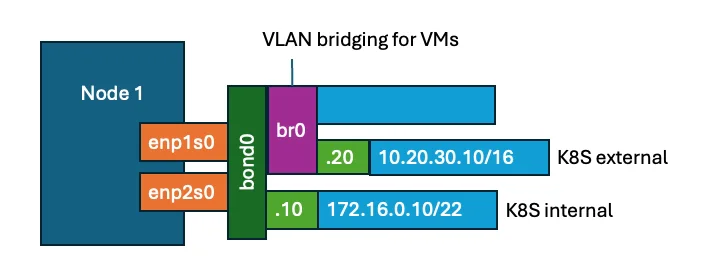
The example defines VLAN 20 as a subinterface of br0 instead of bond0. This configuration allows VMs to run on VLAN
20 without conflict.
To allow traffic on br0.20, edit the VMO layer's cluster profile variables in Local UI. You cannot modify the VMO pack
YAML directly on the VM Launchpad appliance. All configuration flows through profile variables. Enable the variable that
permits VLAN traffic on the host bridge, and set the corresponding VLAN list variable to include both the VLAN IDs
available to VMs and the VLAN IDs used by the host.
If your deployment must connect Kubernetes nodes directly to br0 (uncommon; refer to
The br0 Bridge), also enable the Run Cilium OnBridge (br0) preset in the Cilium pack.
Four NICs, Two Bonds
As an example, consider the following.
| Network | VLAN ID | Network CIDR | Gateway |
|---|---|---|---|
| Host native network (untagged) | 0 (native) | 192.168.0.0/22 | None |
| Kubernetes hosts (management) | 10 | 172.16.0.0/22 | None |
| End user access (data) | 20 | 10.20.30.0/16 | 10.20.30.1 |
| Pod overlay network | N/A (virtual) | 100.64.0.0/18 | None |
| Cluster services network | N/A (virtual) | 100.64.64.0/18 | None |
| Existing VLANs for VMs (21 - 100) | N/A | N/A | N/A |
MetalLB can publish the end user access network for non-VM applications in two ways. MetalLB can use the network to advertise IP addresses directly, through Layer 2 advertisements, or as a BGP network, where MetalLB advertises BGP addresses to BGP routers.
You can choose either option depending on the network equipment used. We recommend a dedicated VLAN for end-user access to Kubernetes services that VMs do not share.
You can share the same VLAN for VMs and Kubernetes, but this configuration requires extra considerations if this VLAN also has the default gateway. The following network configuration on the host, using a total of four NICs in two bonds, is suitable for the setup described.
| Interface | Type | Consisting of | VLAN | CIDR | Gateway |
|---|---|---|---|---|---|
bond_mgmt | Bond (802.3ad) | enp1s0 enp2s0 | native | 192.168.0.0/22 | None |
bond_mgmt.10 | VLAN | bond_mgmt | 10 | 172.16.0.0/22 | None |
bond_data | Bond (802.3ad) | enp1s1 enp2s1 | native | N/A | N/A |
bond_data.20 | VLAN | bond_data | 20 | 10.20.30.0/16 | 10.20.30.1 |
br0 | Bridge | bond_data | native | N/A | N/A |
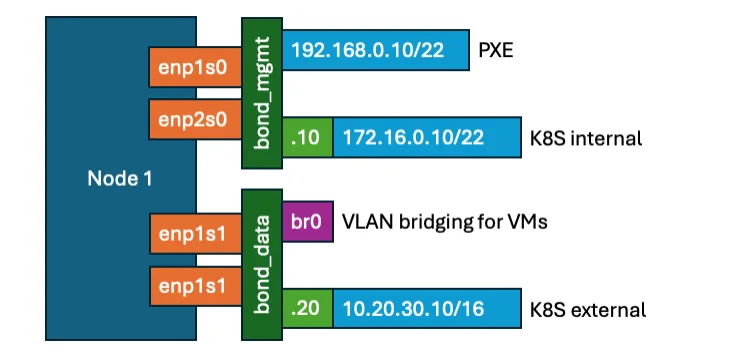
The br0 bridge interface serves as the parent for the Multus Bridge network type, which automatically creates VLAN
subinterfaces on top of br0 to place VMs on the configured VLANs.
The br0 interface sits on top of the bond_data bond interface, which supports only the following bonding modes.
| Bond mode | Description |
|---|---|
| Mode 1 | active-backup (does not require switch configuration) |
| Mode 2 | balance-xor (requires switch configuration) |
| Mode 4 | 802.3ad (requires switch LACP configuration) |
We recommend 802.3ad mode for best performance, as this mode fully aggregates the bandwidth of the links.
The other modes (0, 3, 5, and 6) do not support VLAN bridging due to broadcast storms, MAC address rewrites, or poor TCP stream performance.
For a four-NIC, two-bond configuration, the four physical network interfaces connect to the physical switch as shown in the following example.
| Physical port | Name in OS | Purpose | Switch port config |
|---|---|---|---|
| NIC 1, Port 1 | enp1s0 | Management network | Trunk (VLANs 0, 10) |
| NIC 1, Port 2 | enp2s0 | Management network | Trunk (VLANs 0, 10) |
| NIC 2, Port 1 | enp1s1 | Data network | Trunk (VLANs 20-100) |
| NIC 2, Port 2 | enp2s1 | Data network | Trunk (VLANs 20-100) |
The bond_data.20 subinterface provides outbound connectivity because it has the default gateway. The bond_data.20
subinterface is the primary way to publish services from container workloads to end users. To reach specific data center
networks over the bond_mgmt.10 subinterface, configure static routes on the 172.16.0.0/22 subnet.
For publishing workloads from VMs, you have two options.
-
Place the entire VM on a VLAN by attaching it to a Multus Bridge network that sits on top of the
br0interface. The VM itself (for static IPs) or the network (for DHCP) then assigns IP addresses. This is the most widely used and recommended option. -
Run the VM on the pod network, as if it were a container, and publish individual ports of the VM as Kubernetes services either inside the cluster or externally on the
bond_data.20network. MetalLB assigns the IP addresses.
The second option is only suitable for workloads that can handle network disruptions well. Live migrations of VMs running on the pod network end the existing network connections to those VMs.