Integrate Palette MCP in an Agentic Workflow
One of the key value propositions of MCP servers is that they provide Large Language Models (LLMs) with access to the tools that allow them to perform actions. The alternative to using MCP servers is to implement custom logic to interact with APIs to perform actions. The Palette MCP server can help you power various AI use cases and workflows without having to implement custom logic.
In this tutorial, you will learn how to integrate the Palette MCP into an agentic workflow that identifies if a specific pack is present in your environment's cluster profiles and deployed clusters. If the pack is present, the workflow will ask you what tags you want to apply to the cluster profiles containing the pack and any active clusters using cluster profiles containing the pack. This will allow you to more readily identify the cluster profiles and active clusters that are using the pack.
Below is a high-level diagram of the agentic workflow.

Prerequisites
-
Ensure the following software is installed locally on your workstation.
-
Kind. Use the Kind Installation guide to install Kind.
-
uv. Use the uv Installation guide to install uv.
-
git. Use the git Installation guide to install git.
-
The Palette MCP server is configured in your environment. Refer to the Palette MCP Server section for more information.
-
Helm. Use the Helm Installation guide to install Helm.
-
-
A Palette account.
-
A Palette API key. Check out the Create a Palette API Key guide to learn how to create a Palette API key. guide for further instructions.
-
An OpenAI API key. You can get your OpenAI API key from the OpenAI Platform site.
-
Internet access to clone the Palette tutorial repository and interact with OpenAI API.
Setup
Start by opening a terminal window and clone the Palette tutorial repository.
git clone git@github.com:spectrocloud/tutorials.git
If you already have the Palette tutorial repository cloned, pull the latest changes.
git pull origin main && git fetch --tags
Check out the following git tag.
git checkout v1.3.2
Change to the tutorial directory that contains the code for this tutorial.
cd tutorials/ai/palette-mcp/integrate-palette-mcp/
Next, initialize the tutorial environment by issuing the following command. This installs the dependencies required for the tutorial.
uv sync
Start a Kind cluster by issuing the following command.
kind create cluster --name palette-mcp-agentic-tutorial
This starts a Kind cluster named palette-mcp-agentic.
Creating cluster "palette-mcp-agentic-tutorial" ...
 ✓ Ensuring node image (kindest/node:v1.33.1) 🖼
 ✓ Preparing nodes 📦
 ✓ Writing configuration 📜
 ✓ Starting control-plane 🕹️
 ✓ Installing CNI 🔌
 ✓ Installing StorageClass 💾
Set kubectl context to "kind-palette-mcp-agentic-tutorial"
You can now use your cluster with:

kubectl cluster-info --context kind-palette-mcp-agentic-tutorial
Once the cluster is ready, use the following command to deploy the Kubernetes metrics-server through Helm.
helm repo add metrics-server https://kubernetes-sigs.github.io/metrics-server/
helm repo update
helm upgrade --install --set args={--kubelet-insecure-tls} metrics-server metrics-server/metrics-server --namespace kube-system
The flag --kubelet-insecure-tls is provided to allow the metrics-server to connect to the Kubernetes API server in the
Kind cluster. Otherwise, the metrics-server will not start due to the self-signed SSL certificate used by the Kubernetes
API server.
Import Cluster
Use the freshly created Kind cluster to act as a Palette-deployed cluster, reducing deployment time and removing the need real infrastructure.
Open up a web browser and log in to your Palette account. Navigate to the left main menu and select Clusters. From the cluster list page, click on Import Cluster in the top right corner.
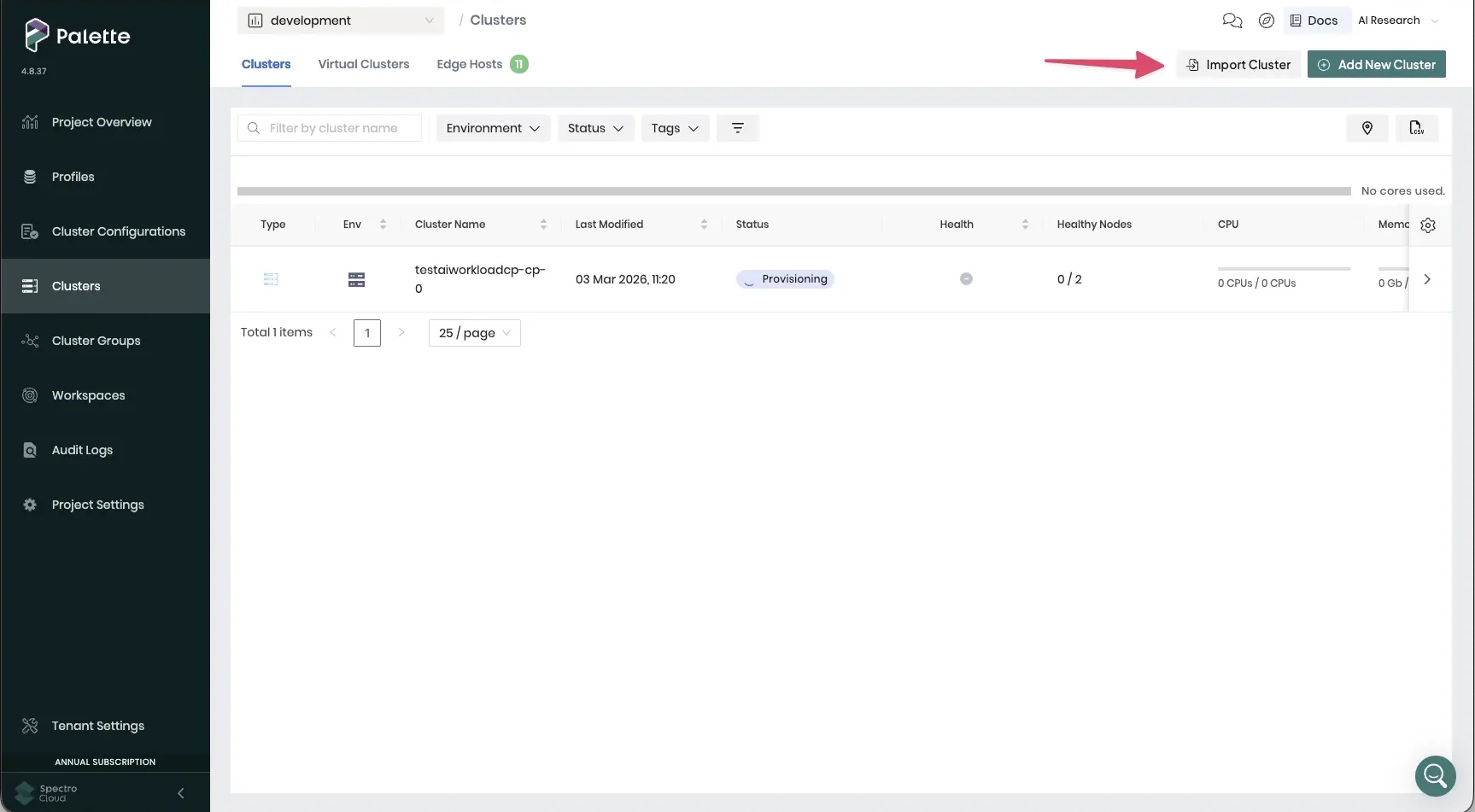
Fill out the following fields.
- Cluster Name:
palette-mcp-agentic-tutorial - Cloud Type:
Generic - Import mode:
Full-permission mode
Select Create & Open Cluster Instance. Palette redirects you to the cluster details page. A set of instructions with commands is displayed on the right side of the screen.
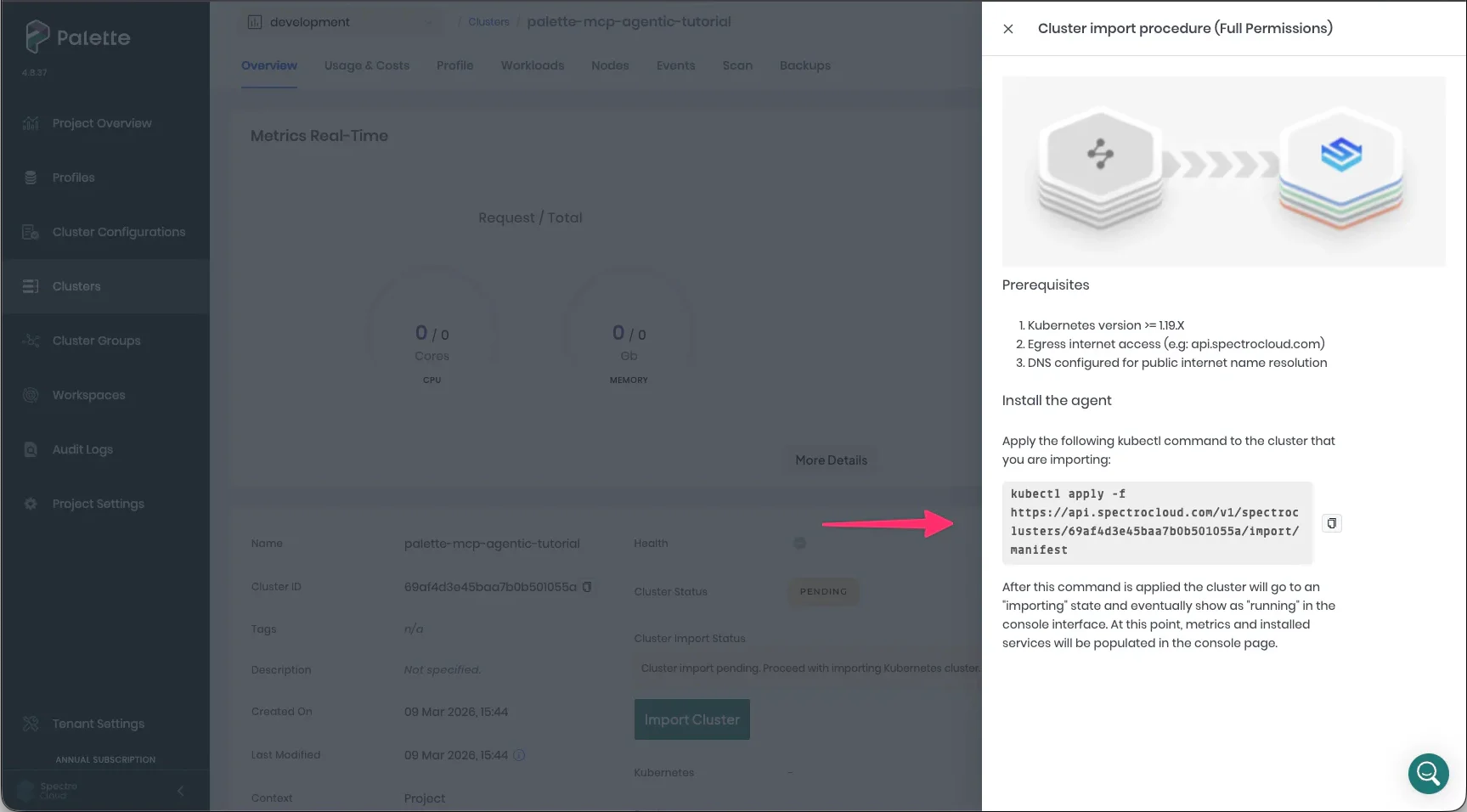
Copy the command to your clipboard, then paste it into your terminal window where you created the Kind cluster. After a few moments, the cluster reports a status of Running in the cluster details page.
In the event you need more detailed instructions on how to import a cluster into Palette, check out the Import a Cluster guide.
Import Cluster Profile
The next step is to deploy a Cluster Profile onto the cluster. For this tutorial, a cluster profile is provided for you to use that contains the Hello Universe pack and the Nginx pack.
Navigate back to the Palette UI. From the left main menu, select Profiles > Import Cluster Profile. Paste the following snippet into the text area.
{
"metadata": {
"name": "tutorial-profile",
"description": "A profile for the Integrate Palette MCP in an Agentic Workflow tutorial.",
"labels": { "tutorial": "spectro__tag" }
},
"spec": {
"version": "1.0.0",
"template": {
"type": "add-on",
"cloudType": "all",
"packs": [
{
"name": "hello-universe",
"type": "oci",
"layer": "addon",
"version": "1.3.1",
"tag": "1.3.1",
"values": "# spectrocloud.com/enabled-presets: Backend:disable-api\npack:\n content:\n images:\n - image: ghcr.io/spectrocloud/hello-universe:1.3.2\n - image: ghcr.io/spectrocloud/hello-universe:1.3.2-proxy\n - image: ghcr.io/spectrocloud/hello-universe-api:1.1.1\n - image: ghcr.io/spectrocloud/hello-universe-db:1.1.0\n spectrocloud.com/install-priority: \"0\"\n\nmanifests:\n hello-universe:\n images:\n hellouniverse: ghcr.io/spectrocloud/hello-universe:1.3.2\n apiEnabled: false\n namespace: hello-universe\n port: 8080\n replicas: 1",
"registry": {
"metadata": {
"uid": "64eaff5630402973c4e1856a",
"name": "Palette Community Registry",
"kind": "oci",
"isPrivate": true,
"providerType": "pack",
"isSyncSupported": true
}
}
},
{
"name": "nginx",
"type": "spectro",
"layer": "addon",
"version": "1.14.3",
"tag": "1.14.3",
"values": "pack:\n content:\n images:\n - image: us-docker.pkg.dev/palette-images/packs/nginx/1.14.3/ingress-nginx-controller:v1.14.3\n - image: us-docker.pkg.dev/palette-images/packs/nginx/1.14.3/nginx:release-1.29.4\n - image: us-docker.pkg.dev/palette-images/packs/nginx/1.14.3/lemonldap-ng-controller:2.22.2\n - image: us-docker.pkg.dev/palette-images/packs/nginx/1.14.3/busybox:1.37.0\n - image: us-docker.pkg.dev/palette-images/packs/nginx/1.14.3/defaultbackend-amd64:1.5\n charts:\n - repo: https://kubernetes.github.io/ingress-nginx\n name: ingress-nginx\n version: 4.14.3\n namespace: \"nginx\"\n spectrocloud.com/install-priority: \"0\"\ncharts:\n ingress-nginx:\n ## nginx configuration\n ## Ref: https://github.com/kubernetes/ingress-nginx/blob/main/docs/user-guide/nginx-configuration/index.md\n ##\n global:\n image:\n # -- Registry host to pull images from.\n registry: us-docker.pkg.dev/palette-images/packs/nginx/1.14.3\n ## Overrides for generated resource names\n # See templates/_helpers.tpl\n # nameOverride:\n # fullnameOverride:\n\n # -- Override the deployment namespace; defaults to .Release.Namespace\n namespaceOverride: \"\"\n ## Labels to apply to all resources\n ##\n commonLabels: {}\n # scmhash: abc123\n # myLabel: aakkmd\n\n controller:\n name: controller\n enableAnnotationValidations: true\n image:\n ## Keep false as default for now!\n chroot: false\n # registry: registry.k8s.io\n image: ingress-nginx-controller\n ## for backwards compatibility consider setting the full image url via the repository value below\n ## use *either* current default registry/image or repository format or installing chart by providing the values.yaml will fail\n ## repository:\n tag: \"v1.14.3\"\n digest: \"\"\n digestChroot: sha256:ffdab64d0e0556f810d82d618a0fa97c4fc8dc2bc5717c51bfe83b5d4252c73e\n pullPolicy: IfNotPresent\n runAsNonRoot: true\n # -- This value must not be changed using the official image.\n # uid=101(www-data) gid=82(www-data) groups=82(www-data)\n runAsUser: 101\n # -- This value must not be changed using the official image.\n # uid=101(www-data) gid=82(www-data) groups=82(www-data)\n runAsGroup: 82\n allowPrivilegeEscalation: false\n seccompProfile:\n type: RuntimeDefault\n readOnlyRootFilesystem: false\n registry: us-docker.pkg.dev/palette-images/packs/nginx/1.14.3\n # -- Configures the controller container name\n containerName: controller\n # -- Configures the ports that the nginx-controller listens on\n containerPort:\n http: 80\n https: 443\n # -- Global configuration passed to the ConfigMap consumed by the controller. Values may contain Helm templates.\n # Ref.: https://kubernetes.github.io/ingress-nginx/user-guide/nginx-configuration/configmap/\n config:\n enable-annotation-validation: true\n strict-validate-path-type: true\n # -- Annotations to be added to the controller config configuration configmap.\n configAnnotations: {}\n # -- Will add custom headers before sending traffic to backends according to https://github.com/kubernetes/ingress-nginx/tree/main/docs/examples/customization/custom-headers\n proxySetHeaders: {}\n # -- Will add custom headers before sending response traffic to the client according to: https://kubernetes.github.io/ingress-nginx/user-guide/nginx-configuration/configmap/#add-headers\n addHeaders: {}\n # -- Optionally customize the pod dnsConfig.\n dnsConfig: {}\n # -- Optionally customize the pod hostAliases.\n hostAliases: []\n # - ip: 127.0.0.1\n # hostnames:\n # - foo.local\n # - bar.local\n # - ip: 10.1.2.3\n # hostnames:\n # - foo.remote\n # - bar.remote\n # -- Optionally customize the pod hostname.\n hostname: {}\n # -- Optionally change this to ClusterFirstWithHostNet in case you have 'hostNetwork: true'.\n # By default, while using host network, name resolution uses the host's DNS. If you wish nginx-controller\n # to keep resolving names inside the k8s network, use ClusterFirstWithHostNet.\n dnsPolicy: ClusterFirst\n # -- Instruct the kubelet to use the named RuntimeClass to run the pod\n runtimeClassName: \"\"\n # -- Bare-metal considerations via the host network https://kubernetes.github.io/ingress-nginx/deploy/baremetal/#via-the-host-network\n # Ingress status was blank because there is no Service exposing the Ingress-Nginx Controller in a configuration using the host network, the default --publish-service flag used in standard cloud setups does not apply\n reportNodeInternalIp: false\n # -- Process Ingress objects without ingressClass annotation/ingressClassName field\n # Overrides value for --watch-ingress-without-class flag of the controller binary\n # Defaults to false\n watchIngressWithoutClass: false\n # -- Process IngressClass per name (additionally as per spec.controller).\n ingressClassByName: false\n # -- This configuration enables Topology Aware Routing feature, used together with service annotation service.kubernetes.io/topology-mode=\"auto\"\n # Defaults to false\n enableTopologyAwareRouting: false\n # -- This configuration disable Nginx Controller Leader Election\n disableLeaderElection: false\n # -- Duration a leader election is valid before it's getting re-elected, e.g. `15s`, `10m` or `1h`. (Default: 30s)\n electionTTL: \"\"\n # -- This configuration defines if Ingress Controller should allow users to set\n # their own *-snippet annotations, otherwise this is forbidden / dropped\n # when users add those annotations.\n # Global snippets in ConfigMap are still respected\n allowSnippetAnnotations: false\n # -- Required for use with CNI based kubernetes installations (such as ones set up by kubeadm),\n # since CNI and hostport don't mix yet. Can be deprecated once https://github.com/kubernetes/kubernetes/issues/23920\n # is merged\n hostNetwork: false\n ## Use host ports 80 and 443\n ## Disabled by default\n hostPort:\n # -- Enable 'hostPort' or not\n enabled: false\n ports:\n # -- 'hostPort' http port\n http: 80\n # -- 'hostPort' https port\n https: 443\n # NetworkPolicy for controller component.\n networkPolicy:\n # -- Enable 'networkPolicy' or not\n enabled: false\n # -- Election ID to use for status update, by default it uses the controller name combined with a suffix of 'leader'\n electionID: \"\"\n # -- This section refers to the creation of the IngressClass resource.\n # IngressClasses are immutable and cannot be changed after creation.\n # We do not support namespaced IngressClasses, yet, so a ClusterRole and a ClusterRoleBinding is required.\n ingressClassResource:\n # -- Name of the IngressClass\n name: nginx\n # -- Create the IngressClass or not\n enabled: true\n # -- If true, Ingresses without `ingressClassName` get assigned to this IngressClass on creation.\n # Ingress creation gets rejected if there are multiple default IngressClasses.\n # Ref: https://kubernetes.io/docs/concepts/services-networking/ingress/#default-ingress-class\n default: true\n # -- Annotations to be added to the IngressClass resource.\n annotations: {}\n # -- Controller of the IngressClass. An Ingress Controller looks for IngressClasses it should reconcile by this value.\n # This value is also being set as the `--controller-class` argument of this Ingress Controller.\n # Ref: https://kubernetes.io/docs/concepts/services-networking/ingress/#ingress-class\n controllerValue: k8s.io/ingress-nginx\n # -- Aliases of this IngressClass. Creates copies with identical settings but the respective alias as name.\n # Useful for development environments with only one Ingress Controller but production-like Ingress resources.\n # `default` gets enabled on the original IngressClass only.\n aliases: []\n # aliases:\n # - nginx-alias-1\n # - nginx-alias-2\n # -- A link to a custom resource containing additional configuration for the controller.\n # This is optional if the controller consuming this IngressClass does not require additional parameters.\n # Ref: https://kubernetes.io/docs/concepts/services-networking/ingress/#ingress-class\n parameters: {}\n # parameters:\n # apiGroup: k8s.example.com\n # kind: IngressParameters\n # name: external-lb\n # -- For backwards compatibility with ingress.class annotation, use ingressClass.\n # Algorithm is as follows, first ingressClassName is considered, if not present, controller looks for ingress.class annotation\n ingressClass: nginx\n # -- Labels to add to the pod container metadata\n podLabels: {}\n # key: value\n\n # -- Security context for controller pods\n podSecurityContext: {}\n # -- sysctls for controller pods\n ## Ref: https://kubernetes.io/docs/tasks/administer-cluster/sysctl-cluster/\n sysctls: {}\n # sysctls:\n # \"net.core.somaxconn\": \"8192\"\n # -- Security context for controller containers\n containerSecurityContext: {}\n # -- Allows customization of the source of the IP address or FQDN to report\n # in the ingress status field. By default, it reads the information provided\n # by the service. If disable, the status field reports the IP address of the\n # node or nodes where an ingress controller pod is running.\n publishService:\n # -- Enable 'publishService' or not\n enabled: true\n # -- Allows overriding of the publish service to bind to\n # Must be \u003cnamespace\u003e/\u003cservice_name\u003e\n pathOverride: \"\"\n # Limit the scope of the controller to a specific namespace\n scope:\n # -- Enable 'scope' or not\n enabled: false\n # -- Namespace to limit the controller to; defaults to $(POD_NAMESPACE)\n namespace: \"\"\n # -- When scope.enabled == false, instead of watching all namespaces, we watching namespaces whose labels\n # only match with namespaceSelector. Format like foo=bar. Defaults to empty, means watching all namespaces.\n namespaceSelector: \"\"\n # -- Allows customization of the configmap / nginx-configmap namespace; defaults to $(POD_NAMESPACE)\n configMapNamespace: \"\"\n tcp:\n # -- Allows customization of the tcp-services-configmap; defaults to $(POD_NAMESPACE)\n configMapNamespace: \"\"\n # -- Annotations to be added to the tcp config configmap\n annotations: {}\n udp:\n # -- Allows customization of the udp-services-configmap; defaults to $(POD_NAMESPACE)\n configMapNamespace: \"\"\n # -- Annotations to be added to the udp config configmap\n annotations: {}\n # -- Maxmind license key to download GeoLite2 Databases.\n ## https://blog.maxmind.com/2019/12/significant-changes-to-accessing-and-using-geolite2-databases/\n maxmindLicenseKey: \"\"\n # -- Additional command line arguments to pass to Ingress-Nginx Controller\n # E.g. to specify the default SSL certificate you can use\n extraArgs: {}\n ## extraArgs:\n ## default-ssl-certificate: \"\u003cnamespace\u003e/\u003csecret_name\u003e\"\n ## time-buckets: \"0.005,0.01,0.025,0.05,0.1,0.25,0.5,1,2.5,5,10\"\n ## length-buckets: \"10,20,30,40,50,60,70,80,90,100\"\n ## size-buckets: \"10,100,1000,10000,100000,1e+06,1e+07\"\n\n # -- Additional environment variables to set\n extraEnvs: []\n # extraEnvs:\n # - name: FOO\n # valueFrom:\n # secretKeyRef:\n # key: FOO\n # name: secret-resource\n\n # -- Use a `DaemonSet` or `Deployment`\n kind: Deployment\n # -- Annotations to be added to the controller Deployment or DaemonSet\n ##\n annotations: {}\n # keel.sh/pollSchedule: \"@every 60m\"\n\n # -- Labels to be added to the controller Deployment or DaemonSet and other resources that do not have option to specify labels\n ##\n labels: {}\n # keel.sh/policy: patch\n # keel.sh/trigger: poll\n\n # -- The update strategy to apply to the Deployment or DaemonSet\n ##\n updateStrategy: {}\n # rollingUpdate:\n # maxUnavailable: 1\n # type: RollingUpdate\n\n # -- Specifies the number of seconds you want to wait for the controller deployment to progress before the system reports back that it has failed.\n # Ref.: https://kubernetes.io/docs/concepts/workloads/controllers/deployment/#progress-deadline-seconds\n progressDeadlineSeconds: 0\n # -- `minReadySeconds` to avoid killing pods before we are ready\n ##\n minReadySeconds: 0\n # -- Node tolerations for server scheduling to nodes with taints\n ## Ref: https://kubernetes.io/docs/concepts/configuration/assign-pod-node/\n ##\n tolerations: []\n # - key: \"key\"\n # operator: \"Equal|Exists\"\n # value: \"value\"\n # effect: \"NoSchedule|PreferNoSchedule|NoExecute(1.6 only)\"\n\n # -- Affinity and anti-affinity rules for server scheduling to nodes\n ## Ref: https://kubernetes.io/docs/concepts/configuration/assign-pod-node/#affinity-and-anti-affinity\n ##\n affinity: {}\n # # An example of preferred pod anti-affinity, weight is in the range 1-100\n # podAntiAffinity:\n # preferredDuringSchedulingIgnoredDuringExecution:\n # - weight: 100\n # podAffinityTerm:\n # labelSelector:\n # matchExpressions:\n # - key: app.kubernetes.io/name\n # operator: In\n # values:\n # - '{{ include \"ingress-nginx.name\" . }}'\n # - key: app.kubernetes.io/instance\n # operator: In\n # values:\n # - '{{ .Release.Name }}'\n # - key: app.kubernetes.io/component\n # operator: In\n # values:\n # - controller\n # topologyKey: kubernetes.io/hostname\n\n # # An example of required pod anti-affinity\n # podAntiAffinity:\n # requiredDuringSchedulingIgnoredDuringExecution:\n # - labelSelector:\n # matchExpressions:\n # - key: app.kubernetes.io/name\n # operator: In\n # values:\n # - '{{ include \"ingress-nginx.name\" . }}'\n # - key: app.kubernetes.io/instance\n # operator: In\n # values:\n # - '{{ .Release.Name }}'\n # - key: app.kubernetes.io/component\n # operator: In\n # values:\n # - controller\n # topologyKey: kubernetes.io/hostname\n\n # -- Topology spread constraints rely on node labels to identify the topology domain(s) that each Node is in.\n ## Ref: https://kubernetes.io/docs/concepts/workloads/pods/pod-topology-spread-constraints/\n ##\n topologySpreadConstraints: []\n # - labelSelector:\n # matchLabels:\n # app.kubernetes.io/name: '{{ include \"ingress-nginx.name\" . }}'\n # app.kubernetes.io/instance: '{{ .Release.Name }}'\n # app.kubernetes.io/component: controller\n # matchLabelKeys:\n # - pod-template-hash\n # topologyKey: topology.kubernetes.io/zone\n # maxSkew: 1\n # whenUnsatisfiable: ScheduleAnyway\n # - labelSelector:\n # matchLabels:\n # app.kubernetes.io/name: '{{ include \"ingress-nginx.name\" . }}'\n # app.kubernetes.io/instance: '{{ .Release.Name }}'\n # app.kubernetes.io/component: controller\n # matchLabelKeys:\n # - pod-template-hash\n # topologyKey: kubernetes.io/hostname\n # maxSkew: 1\n # whenUnsatisfiable: ScheduleAnyway\n\n # -- `terminationGracePeriodSeconds` to avoid killing pods before we are ready\n ## wait up to five minutes for the drain of connections\n ##\n terminationGracePeriodSeconds: 300\n # -- Node labels for controller pod assignment\n ## Ref: https://kubernetes.io/docs/concepts/scheduling-eviction/assign-pod-node/\n ##\n nodeSelector:\n kubernetes.io/os: linux\n ## Liveness and readiness probe values\n ## Ref: https://kubernetes.io/docs/concepts/workloads/pods/pod-lifecycle/#container-probes\n ##\n ## startupProbe:\n ## httpGet:\n ## # should match container.healthCheckPath\n ## path: \"/healthz\"\n ## port: 10254\n ## scheme: HTTP\n ## initialDelaySeconds: 5\n ## periodSeconds: 5\n ## timeoutSeconds: 2\n ## successThreshold: 1\n ## failureThreshold: 5\n livenessProbe:\n httpGet:\n # should match container.healthCheckPath\n path: \"/healthz\"\n port: 10254\n scheme: HTTP\n initialDelaySeconds: 10\n periodSeconds: 10\n timeoutSeconds: 1\n successThreshold: 1\n failureThreshold: 5\n readinessProbe:\n httpGet:\n # should match container.healthCheckPath\n path: \"/healthz\"\n port: 10254\n scheme: HTTP\n initialDelaySeconds: 10\n periodSeconds: 10\n timeoutSeconds: 1\n successThreshold: 1\n failureThreshold: 3\n # -- Path of the health check endpoint. All requests received on the port defined by\n # the healthz-port parameter are forwarded internally to this path.\n healthCheckPath: \"/healthz\"\n # -- Address to bind the health check endpoint.\n # It is better to set this option to the internal node address\n # if the Ingress-Nginx Controller is running in the `hostNetwork: true` mode.\n healthCheckHost: \"\"\n # -- Annotations to be added to controller pods\n ##\n podAnnotations: {}\n replicaCount: 1\n # -- Minimum available pods set in PodDisruptionBudget.\n # Define either 'minAvailable' or 'maxUnavailable', never both.\n minAvailable: 1\n # -- Maximum unavailable pods set in PodDisruptionBudget. If set, 'minAvailable' is ignored.\n # maxUnavailable: 1\n # -- Eviction policy for unhealthy pods guarded by PodDisruptionBudget.\n # Ref: https://kubernetes.io/blog/2023/01/06/unhealthy-pod-eviction-policy-for-pdbs/\n unhealthyPodEvictionPolicy: \"\"\n ## Define requests resources to avoid probe issues due to CPU utilization in busy nodes\n ## ref: https://github.com/kubernetes/ingress-nginx/issues/4735#issuecomment-551204903\n ## Ideally, there should be no limits.\n ## https://engineering.indeedblog.com/blog/2019/12/cpu-throttling-regression-fix/\n resources:\n ## limits:\n ## cpu: 100m\n ## memory: 90Mi\n requests:\n cpu: 100m\n memory: 90Mi\n # -- Resize policy for controller containers.\n # Ref: https://kubernetes.io/docs/tasks/configure-pod-container/resize-container-resources\n resizePolicy: []\n # - resourceName: cpu\n # restartPolicy: NotRequired\n # - resourceName: memory\n # restartPolicy: RestartContainer\n # Mutually exclusive with keda autoscaling\n autoscaling:\n enabled: false\n annotations: {}\n minReplicas: 1\n maxReplicas: 11\n targetCPUUtilizationPercentage: 50\n targetMemoryUtilizationPercentage: 50\n behavior: {}\n # scaleDown:\n # stabilizationWindowSeconds: 300\n # policies:\n # - type: Pods\n # value: 1\n # periodSeconds: 180\n # scaleUp:\n # stabilizationWindowSeconds: 300\n # policies:\n # - type: Pods\n # value: 2\n # periodSeconds: 60\n autoscalingTemplate: []\n # Custom or additional autoscaling metrics\n # ref: https://kubernetes.io/docs/tasks/run-application/horizontal-pod-autoscale/#support-for-custom-metrics\n # - type: Pods\n # pods:\n # metric:\n # name: nginx_ingress_controller_nginx_process_requests_total\n # target:\n # type: AverageValue\n # averageValue: 10000m\n\n # Mutually exclusive with hpa autoscaling\n keda:\n apiVersion: \"keda.sh/v1alpha1\"\n ## apiVersion changes with keda 1.x vs 2.x\n ## 2.x = keda.sh/v1alpha1\n ## 1.x = keda.k8s.io/v1alpha1\n enabled: false\n minReplicas: 1\n maxReplicas: 11\n pollingInterval: 30\n cooldownPeriod: 300\n # fallback:\n # failureThreshold: 3\n # replicas: 11\n restoreToOriginalReplicaCount: false\n scaledObject:\n annotations: {}\n # Custom annotations for ScaledObject resource\n # annotations:\n # key: value\n triggers: []\n # - type: prometheus\n # metadata:\n # serverAddress: http://\u003cprometheus-host\u003e:9090\n # metricName: http_requests_total\n # threshold: '100'\n # query: sum(rate(http_requests_total{deployment=\"my-deployment\"}[2m]))\n\n behavior: {}\n # scaleDown:\n # stabilizationWindowSeconds: 300\n # policies:\n # - type: Pods\n # value: 1\n # periodSeconds: 180\n # scaleUp:\n # stabilizationWindowSeconds: 300\n # policies:\n # - type: Pods\n # value: 2\n # periodSeconds: 60\n # -- Enable mimalloc as a drop-in replacement for malloc.\n ## ref: https://github.com/microsoft/mimalloc\n ##\n enableMimalloc: true\n ## Override NGINX template\n customTemplate:\n configMapName: \"\"\n configMapKey: \"\"\n service:\n # -- Enable controller services or not. This does not influence the creation of either the admission webhook or the metrics service.\n enabled: true\n external:\n # -- Enable the external controller service or not. Useful for internal-only deployments.\n enabled: true\n # -- Labels to be added to the external controller service.\n labels: {}\n # -- Annotations to be added to the external controller service. See `controller.service.internal.annotations` for annotations to be added to the internal controller service.\n annotations: {}\n # -- Labels to be added to both controller services.\n labels: {}\n # -- Type of the external controller service.\n # Ref: https://kubernetes.io/docs/concepts/services-networking/service/#publishing-services-service-types\n type: LoadBalancer\n # -- Pre-defined cluster internal IP address of the external controller service. Take care of collisions with existing services.\n # This value is immutable. Set once, it can not be changed without deleting and re-creating the service.\n # Ref: https://kubernetes.io/docs/concepts/services-networking/service/#choosing-your-own-ip-address\n clusterIP: \"\"\n # -- Pre-defined cluster internal IP addresses of the external controller service. Take care of collisions with existing services.\n # This value is immutable. Set once, it can not be changed without deleting and re-creating the service.\n # Ref: https://kubernetes.io/docs/concepts/services-networking/service/#choosing-your-own-ip-address\n clusterIPs: []\n # -- List of node IP addresses at which the external controller service is available.\n # Ref: https://kubernetes.io/docs/concepts/services-networking/service/#external-ips\n externalIPs: []\n # -- Deprecated: Pre-defined IP address of the external controller service. Used by cloud providers to connect the resulting load balancer service to a pre-existing static IP.\n # Ref: https://kubernetes.io/docs/concepts/services-networking/service/#loadbalancer\n loadBalancerIP: \"\"\n # -- Restrict access to the external controller service. Values must be CIDRs. Allows any source address by default.\n loadBalancerSourceRanges: []\n # -- Load balancer class of the external controller service. Used by cloud providers to select a load balancer implementation other than the cloud provider default.\n # Ref: https://kubernetes.io/docs/concepts/services-networking/service/#load-balancer-class\n loadBalancerClass: \"\"\n # -- Enable node port allocation for the external controller service or not. Applies to type `LoadBalancer` only.\n # Ref: https://kubernetes.io/docs/concepts/services-networking/service/#load-balancer-nodeport-allocation\n # allocateLoadBalancerNodePorts: true\n\n # -- External traffic policy of the external controller service. Set to \"Local\" to preserve source IP on providers supporting it.\n # Ref: https://kubernetes.io/docs/tasks/access-application-cluster/create-external-load-balancer/#preserving-the-client-source-ip\n externalTrafficPolicy: \"\"\n # -- Session affinity of the external controller service. Must be either \"None\" or \"ClientIP\" if set. Defaults to \"None\".\n # Ref: https://kubernetes.io/docs/reference/networking/virtual-ips/#session-affinity\n sessionAffinity: \"\"\n # -- Specifies the health check node port (numeric port number) for the external controller service.\n # If not specified, the service controller allocates a port from your cluster's node port range.\n # Ref: https://kubernetes.io/docs/tasks/access-application-cluster/create-external-load-balancer/#preserving-the-client-source-ip\n # healthCheckNodePort: 0\n\n # -- Traffic distribution policy of the external controller service. Set to \"PreferClose\" to route traffic to endpoints that are topologically closer to the client.\n # Ref: https://kubernetes.io/docs/concepts/services-networking/service/#traffic-distribution\n trafficDistribution: \"\"\n # -- Represents the dual-stack capabilities of the external controller service. Possible values are SingleStack, PreferDualStack or RequireDualStack.\n # Fields `ipFamilies` and `clusterIP` depend on the value of this field.\n # Ref: https://kubernetes.io/docs/concepts/services-networking/dual-stack/#services\n ipFamilyPolicy: SingleStack\n # -- List of IP families (e.g. IPv4, IPv6) assigned to the external controller service. This field is usually assigned automatically based on cluster configuration and the `ipFamilyPolicy` field.\n # Ref: https://kubernetes.io/docs/concepts/services-networking/dual-stack/#services\n ipFamilies:\n - IPv4\n # -- Enable the HTTP listener on both controller services or not.\n enableHttp: true\n # -- Enable the HTTPS listener on both controller services or not.\n enableHttps: true\n ports:\n # -- Port the external HTTP listener is published with.\n http: 80\n # -- Port the external HTTPS listener is published with.\n https: 443\n targetPorts:\n # -- Port of the ingress controller the external HTTP listener is mapped to.\n http: http\n # -- Port of the ingress controller the external HTTPS listener is mapped to.\n https: https\n # -- Declare the app protocol of the external HTTP and HTTPS listeners or not. Supersedes provider-specific annotations for declaring the backend protocol.\n # Ref: https://kubernetes.io/docs/concepts/services-networking/service/#application-protocol\n appProtocol: true\n nodePorts:\n # -- Node port allocated for the external HTTP listener. If left empty, the service controller allocates one from the configured node port range.\n http: \"\"\n # -- Node port allocated for the external HTTPS listener. If left empty, the service controller allocates one from the configured node port range.\n https: \"\"\n # -- Node port mapping for external TCP listeners. If left empty, the service controller allocates them from the configured node port range.\n # Example:\n # tcp:\n # 8080: 30080\n tcp: {}\n # -- Node port mapping for external UDP listeners. If left empty, the service controller allocates them from the configured node port range.\n # Example:\n # udp:\n # 53: 30053\n udp: {}\n internal:\n # -- Enable the internal controller service or not. Remember to configure `controller.service.internal.annotations` when enabling this.\n enabled: false\n # -- Labels to be added to the internal controller service.\n labels: {}\n # -- Annotations to be added to the internal controller service. Mandatory for the internal controller service to be created. Varies with the cloud service.\n # Ref: https://kubernetes.io/docs/concepts/services-networking/service/#internal-load-balancer\n annotations: {}\n # -- Type of the internal controller service.\n # Defaults to the value of `controller.service.type`.\n # Ref: https://kubernetes.io/docs/concepts/services-networking/service/#publishing-services-service-types\n type: \"\"\n # -- Pre-defined cluster internal IP address of the internal controller service. Take care of collisions with existing services.\n # This value is immutable. Set once, it can not be changed without deleting and re-creating the service.\n # Ref: https://kubernetes.io/docs/concepts/services-networking/service/#choosing-your-own-ip-address\n clusterIP: \"\"\n # -- Pre-defined cluster internal IP addresses of the internal controller service. Take care of collisions with existing services.\n # This value is immutable. Set once, it can not be changed without deleting and re-creating the service.\n # Ref: https://kubernetes.io/docs/concepts/services-networking/service/#choosing-your-own-ip-address\n clusterIPs: []\n # -- List of node IP addresses at which the internal controller service is available.\n # Ref: https://kubernetes.io/docs/concepts/services-networking/service/#external-ips\n externalIPs: []\n # -- Deprecated: Pre-defined IP address of the internal controller service. Used by cloud providers to connect the resulting load balancer service to a pre-existing static IP.\n # Ref: https://kubernetes.io/docs/concepts/services-networking/service/#loadbalancer\n loadBalancerIP: \"\"\n # -- Restrict access to the internal controller service. Values must be CIDRs. Allows any source address by default.\n loadBalancerSourceRanges: []\n # -- Load balancer class of the internal controller service. Used by cloud providers to select a load balancer implementation other than the cloud provider default.\n # Ref: https://kubernetes.io/docs/concepts/services-networking/service/#load-balancer-class\n loadBalancerClass: \"\"\n # -- Enable node port allocation for the internal controller service or not. Applies to type `LoadBalancer` only.\n # Ref: https://kubernetes.io/docs/concepts/services-networking/service/#load-balancer-nodeport-allocation\n # allocateLoadBalancerNodePorts: true\n\n # -- External traffic policy of the internal controller service. Set to \"Local\" to preserve source IP on providers supporting it.\n # Ref: https://kubernetes.io/docs/tasks/access-application-cluster/create-external-load-balancer/#preserving-the-client-source-ip\n externalTrafficPolicy: \"\"\n # -- Session affinity of the internal controller service. Must be either \"None\" or \"ClientIP\" if set. Defaults to \"None\".\n # Ref: https://kubernetes.io/docs/reference/networking/virtual-ips/#session-affinity\n sessionAffinity: \"\"\n # -- Specifies the health check node port (numeric port number) for the internal controller service.\n # If not specified, the service controller allocates a port from your cluster's node port range.\n # Ref: https://kubernetes.io/docs/tasks/access-application-cluster/create-external-load-balancer/#preserving-the-client-source-ip\n # healthCheckNodePort: 0\n\n # -- Traffic distribution policy of the internal controller service. Set to \"PreferClose\" to route traffic to endpoints that are topologically closer to the client.\n # Ref: https://kubernetes.io/docs/concepts/services-networking/service/#traffic-distribution\n trafficDistribution: \"\"\n # -- Represents the dual-stack capabilities of the internal controller service. Possible values are SingleStack, PreferDualStack or RequireDualStack.\n # Fields `ipFamilies` and `clusterIP` depend on the value of this field.\n # Ref: https://kubernetes.io/docs/concepts/services-networking/dual-stack/#services\n ipFamilyPolicy: SingleStack\n # -- List of IP families (e.g. IPv4, IPv6) assigned to the internal controller service. This field is usually assigned automatically based on cluster configuration and the `ipFamilyPolicy` field.\n # Ref: https://kubernetes.io/docs/concepts/services-networking/dual-stack/#services\n ipFamilies:\n - IPv4\n ports: {}\n # -- Port the internal HTTP listener is published with.\n # Defaults to the value of `controller.service.ports.http`.\n # http: 80\n # -- Port the internal HTTPS listener is published with.\n # Defaults to the value of `controller.service.ports.https`.\n # https: 443\n\n targetPorts: {}\n # -- Port of the ingress controller the internal HTTP listener is mapped to.\n # Defaults to the value of `controller.service.targetPorts.http`.\n # http: http\n # -- Port of the ingress controller the internal HTTPS listener is mapped to.\n # Defaults to the value of `controller.service.targetPorts.https`.\n # https: https\n\n # -- Declare the app protocol of the internal HTTP and HTTPS listeners or not. Supersedes provider-specific annotations for declaring the backend protocol.\n # Ref: https://kubernetes.io/docs/concepts/services-networking/service/#application-protocol\n appProtocol: true\n nodePorts:\n # -- Node port allocated for the internal HTTP listener. If left empty, the service controller allocates one from the configured node port range.\n http: \"\"\n # -- Node port allocated for the internal HTTPS listener. If left empty, the service controller allocates one from the configured node port range.\n https: \"\"\n # -- Node port mapping for internal TCP listeners. If left empty, the service controller allocates them from the configured node port range.\n # Example:\n # tcp:\n # 8080: 30080\n tcp: {}\n # -- Node port mapping for internal UDP listeners. If left empty, the service controller allocates them from the configured node port range.\n # Example:\n # udp:\n # 53: 30053\n udp: {}\n # shareProcessNamespace enables process namespace sharing within the pod.\n # This can be used for example to signal log rotation using `kill -USR1` from a sidecar.\n shareProcessNamespace: false\n # -- Additional containers to be added to the controller pod.\n # See https://github.com/lemonldap-ng-controller/lemonldap-ng-controller as example.\n extraContainers: []\n # - name: my-sidecar\n # image: us-docker.pkg.dev/palette-images/packs/nginx/1.14.3/nginx:release-1.29.4\n # - name: lemonldap-ng-controller\n # image: us-docker.pkg.dev/palette-images/packs/nginx/1.14.3/lemonldap-ng-controller:2.22.2\n # args:\n # - /lemonldap-ng-controller\n # - --alsologtostderr\n # - --configmap=$(POD_NAMESPACE)/lemonldap-ng-configuration\n # env:\n # - name: POD_NAME\n # valueFrom:\n # fieldRef:\n # fieldPath: metadata.name\n # - name: POD_NAMESPACE\n # valueFrom:\n # fieldRef:\n # fieldPath: metadata.namespace\n # volumeMounts:\n # - name: copy-portal-skins\n # mountPath: /srv/var/lib/lemonldap-ng/portal/skins\n\n # -- Additional volumeMounts to the controller main container.\n extraVolumeMounts: []\n # - name: copy-portal-skins\n # mountPath: /var/lib/lemonldap-ng/portal/skins\n\n # -- Additional volumes to the controller pod.\n extraVolumes: []\n # - name: copy-portal-skins\n # emptyDir: {}\n\n # -- Containers, which are run before the app containers are started. Values may contain Helm templates.\n extraInitContainers: []\n # - name: init-myservice\n # image: us-docker.pkg.dev/palette-images/packs/nginx/1.14.3/busybox:1.37.0\n # command: ['sh', '-c', 'until nslookup myservice; do echo waiting for myservice; sleep 2; done;']\n # - name: init-dynamic\n # image: us-docker.pkg.dev/palette-images/packs/nginx/1.14.3/busybox:1.37.0\n # command:\n # - sh\n # - -c\n # - echo \"Release={{ .Release.Name }} Namespace={{ .Release.Namespace }}\"\n\n # -- Modules, which are mounted into the core nginx image.\n extraModules: []\n # - name: mytestmodule\n # image:\n # # registry: registry.k8s.io\n # image: ingress-nginx/mytestmodule\n # ## for backwards compatibility consider setting the full image url via the repository value below\n # ## use *either* current default registry/image or repository format or installing chart by providing the values.yaml will fail\n # ## repository:\n # tag: \"v1.0.0\"\n # digest: \"\"\n # distroless: false\n # containerSecurityContext:\n # runAsNonRoot: true\n # runAsUser: \u003cuser-id\u003e\n # runAsGroup: \u003cgroup-id\u003e\n # allowPrivilegeEscalation: false\n # seccompProfile:\n # type: RuntimeDefault\n # capabilities:\n # drop:\n # - ALL\n # readOnlyRootFilesystem: true\n # resources: {}\n #\n # The image must contain a `/usr/local/bin/init_module.sh` executable, which\n # will be executed as initContainers, to move its config files within the\n # mounted volume.\n\n admissionWebhooks:\n name: admission\n annotations: {}\n # ignore-check.kube-linter.io/no-read-only-rootfs: \"This deployment needs write access to root filesystem\".\n\n ## Additional annotations to the admission webhooks.\n ## These annotations will be added to the ValidatingWebhookConfiguration and\n ## the Jobs Spec of the admission webhooks.\n enabled: true\n # -- Additional environment variables to set\n extraEnvs: []\n # extraEnvs:\n # - name: FOO\n # valueFrom:\n # secretKeyRef:\n # key: FOO\n # name: secret-resource\n # -- Admission Webhook failure policy to use\n failurePolicy: Fail\n # timeoutSeconds: 10\n port: 8443\n certificate: \"/usr/local/certificates/cert\"\n key: \"/usr/local/certificates/key\"\n namespaceSelector: {}\n objectSelector: {}\n # -- Labels to be added to admission webhooks\n labels: {}\n service:\n annotations: {}\n # clusterIP: \"\"\n externalIPs: []\n # loadBalancerIP: \"\"\n loadBalancerSourceRanges: []\n servicePort: 443\n type: ClusterIP\n # Use certmanager to generate webhook certs\n certManager:\n enabled: true\n # self-signed root certificate\n rootCert:\n # default to be 5y\n duration: \"\"\n # -- Revision history limit of the root certificate.\n # Ref.: https://cert-manager.io/docs/reference/api-docs/#cert-manager.io/v1.CertificateSpec\n revisionHistoryLimit: 0\n admissionCert:\n # default to be 1y\n duration: \"78894h\"\n # -- Revision history limit of the webhook certificate.\n # Ref.: https://cert-manager.io/docs/reference/api-docs/#cert-manager.io/v1.CertificateSpec\n revisionHistoryLimit: 0\n # issuerRef:\n # name: \"issuer\"\n # kind: \"ClusterIssuer\"\n metrics:\n port: 10254\n portName: metrics\n # if this port is changed, change healthz-port: in extraArgs: accordingly\n enabled: true\n service:\n # -- Enable the metrics service or not.\n enabled: true\n annotations: {}\n # prometheus.io/scrape: \"true\"\n # prometheus.io/port: \"10254\"\n # -- Labels to be added to the metrics service resource\n labels: {}\n # clusterIP: \"\"\n\n # -- List of IP addresses at which the stats-exporter service is available\n ## Ref: https://kubernetes.io/docs/concepts/services-networking/service/#external-ips\n ##\n externalIPs: []\n # loadBalancerIP: \"\"\n loadBalancerSourceRanges: []\n servicePort: 10254\n type: ClusterIP\n # externalTrafficPolicy: \"\"\n # nodePort: \"\"\n serviceMonitor:\n enabled: false\n additionalLabels: {}\n # -- Annotations to be added to the ServiceMonitor.\n annotations: {}\n ## The label to use to retrieve the job name from.\n ## jobLabel: \"app.kubernetes.io/name\"\n namespace: \"\"\n namespaceSelector: {}\n ## Default: scrape .Release.Namespace or namespaceOverride only\n ## To scrape all, use the following:\n ## namespaceSelector:\n ## any: true\n scrapeInterval: 30s\n # -- Timeout after which the scrape is ended. Not being set if empty and therefore defaults to the global Prometheus scrape timeout.\n scrapeTimeout: \"\"\n # honorLabels: true\n targetLabels: []\n relabelings: []\n metricRelabelings: []\n # -- Per-scrape limit on number of labels that will be accepted for a sample.\n labelLimit: 0\n # -- Per-scrape limit on length of labels name that will be accepted for a sample.\n labelNameLengthLimit: 0\n # -- Per-scrape limit on length of labels value that will be accepted for a sample.\n labelValueLengthLimit: 0\n # -- Defines a per-scrape limit on the number of scraped samples that will be accepted.\n sampleLimit: 0\n # -- Defines a limit on the number of scraped targets that will be accepted.\n targetLimit: 0\n prometheusRule:\n enabled: false\n additionalLabels: {}\n # -- Annotations to be added to the PrometheusRule.\n annotations: {}\n # namespace: \"\"\n rules: []\n # # These are just examples rules, please adapt them to your needs\n # - alert: NGINXConfigFailed\n # expr: count(nginx_ingress_controller_config_last_reload_successful == 0) \u003e 0\n # for: 1s\n # labels:\n # severity: critical\n # annotations:\n # description: bad ingress config - nginx config test failed\n # summary: uninstall the latest ingress changes to allow config reloads to resume\n # # By default a fake self-signed certificate is generated as default and\n # # it is fine if it expires. If `--default-ssl-certificate` flag is used\n # # and a valid certificate passed please do not filter for `host` label!\n # # (i.e. delete `{host!=\"_\"}` so also the default SSL certificate is\n # # checked for expiration)\n # - alert: NGINXCertificateExpiry\n # expr: (avg(nginx_ingress_controller_ssl_expire_time_seconds{host!=\"_\"}) by (host) - time()) \u003c 604800\n # for: 1s\n # labels:\n # severity: critical\n # annotations:\n # description: ssl certificate(s) will expire in less then a week\n # summary: renew expiring certificates to avoid downtime\n # - alert: NGINXTooMany500s\n # expr: 100 * ( sum( nginx_ingress_controller_requests{status=~\"5.+\"} ) / sum(nginx_ingress_controller_requests) ) \u003e 5\n # for: 1m\n # labels:\n # severity: warning\n # annotations:\n # description: Too many 5XXs\n # summary: More than 5% of all requests returned 5XX, this requires your attention\n # - alert: NGINXTooMany400s\n # expr: 100 * ( sum( nginx_ingress_controller_requests{status=~\"4.+\"} ) / sum(nginx_ingress_controller_requests) ) \u003e 5\n # for: 1m\n # labels:\n # severity: warning\n # annotations:\n # description: Too many 4XXs\n # summary: More than 5% of all requests returned 4XX, this requires your attention\n # -- Improve connection draining when ingress controller pod is deleted using a lifecycle hook:\n # With this new hook, we increased the default terminationGracePeriodSeconds from 30 seconds\n # to 300, allowing the draining of connections up to five minutes.\n # If the active connections end before that, the pod will terminate gracefully at that time.\n # To effectively take advantage of this feature, the Configmap feature\n # worker-shutdown-timeout new value is 240s instead of 10s.\n ##\n lifecycle:\n preStop:\n exec:\n command:\n - /wait-shutdown\n priorityClassName: \"\"\n # -- Rollback limit\n ##\n revisionHistoryLimit: 10\n ## Default 404 backend\n ##\n defaultBackend:\n ##\n enabled: false\n name: defaultbackend\n image:\n # registry: registry.k8s.io\n image: defaultbackend-amd64\n ## for backwards compatibility consider setting the full image url via the repository value below\n ## use *either* current default registry/image or repository format or installing chart by providing the values.yaml will fail\n ## repository:\n tag: \"1.5\"\n pullPolicy: IfNotPresent\n runAsNonRoot: true\n # nobody user -\u003e uid 65534\n runAsUser: 65534\n runAsGroup: 65534\n allowPrivilegeEscalation: false\n seccompProfile:\n type: RuntimeDefault\n readOnlyRootFilesystem: true\n registry: us-docker.pkg.dev/palette-images/packs/nginx/1.14.3\n extraArgs: {}\n serviceAccount:\n create: true\n name: \"\"\n automountServiceAccountToken: true\n # -- Additional environment variables to set for defaultBackend pods\n extraEnvs: []\n port: 8080\n ## Readiness and liveness probes for default backend\n ## Ref: https://kubernetes.io/docs/tasks/configure-pod-container/configure-liveness-readiness-probes/\n ##\n livenessProbe:\n failureThreshold: 3\n initialDelaySeconds: 30\n periodSeconds: 10\n successThreshold: 1\n timeoutSeconds: 5\n readinessProbe:\n failureThreshold: 6\n initialDelaySeconds: 0\n periodSeconds: 5\n successThreshold: 1\n timeoutSeconds: 5\n # -- The update strategy to apply to the Deployment or DaemonSet\n ##\n updateStrategy: {}\n # rollingUpdate:\n # maxUnavailable: 1\n # type: RollingUpdate\n\n # -- `minReadySeconds` to avoid killing pods before we are ready\n ##\n minReadySeconds: 0\n # -- Node tolerations for server scheduling to nodes with taints\n ## Ref: https://kubernetes.io/docs/concepts/configuration/assign-pod-node/\n ##\n tolerations: []\n # - key: \"key\"\n # operator: \"Equal|Exists\"\n # value: \"value\"\n # effect: \"NoSchedule|PreferNoSchedule|NoExecute(1.6 only)\"\n\n # -- Affinity and anti-affinity rules for server scheduling to nodes\n ## Ref: https://kubernetes.io/docs/concepts/configuration/assign-pod-node/#affinity-and-anti-affinity\n affinity: {}\n # # An example of preferred pod anti-affinity, weight is in the range 1-100\n # podAntiAffinity:\n # preferredDuringSchedulingIgnoredDuringExecution:\n # - weight: 100\n # podAffinityTerm:\n # labelSelector:\n # matchExpressions:\n # - key: app.kubernetes.io/name\n # operator: In\n # values:\n # - '{{ include \"ingress-nginx.name\" . }}'\n # - key: app.kubernetes.io/instance\n # operator: In\n # values:\n # - '{{ .Release.Name }}'\n # - key: app.kubernetes.io/component\n # operator: In\n # values:\n # - default-backend\n # topologyKey: kubernetes.io/hostname\n\n # # An example of required pod anti-affinity\n # podAntiAffinity:\n # requiredDuringSchedulingIgnoredDuringExecution:\n # - labelSelector:\n # matchExpressions:\n # - key: app.kubernetes.io/name\n # operator: In\n # values:\n # - '{{ include \"ingress-nginx.name\" . }}'\n # - key: app.kubernetes.io/instance\n # operator: In\n # values:\n # - '{{ .Release.Name }}'\n # - key: app.kubernetes.io/component\n # operator: In\n # values:\n # - default-backend\n # topologyKey: kubernetes.io/hostname\n\n # -- Topology spread constraints rely on node labels to identify the topology domain(s) that each Node is in.\n # Ref.: https://kubernetes.io/docs/concepts/workloads/pods/pod-topology-spread-constraints/\n topologySpreadConstraints: []\n # - labelSelector:\n # matchLabels:\n # app.kubernetes.io/name: '{{ include \"ingress-nginx.name\" . }}'\n # app.kubernetes.io/instance: '{{ .Release.Name }}'\n # app.kubernetes.io/component: default-backend\n # matchLabelKeys:\n # - pod-template-hash\n # topologyKey: topology.kubernetes.io/zone\n # maxSkew: 1\n # whenUnsatisfiable: ScheduleAnyway\n # - labelSelector:\n # matchLabels:\n # app.kubernetes.io/name: '{{ include \"ingress-nginx.name\" . }}'\n # app.kubernetes.io/instance: '{{ .Release.Name }}'\n # app.kubernetes.io/component: default-backend\n # matchLabelKeys:\n # - pod-template-hash\n # topologyKey: kubernetes.io/hostname\n # maxSkew: 1\n # whenUnsatisfiable: ScheduleAnyway\n # -- Security context for default backend pods\n podSecurityContext: {}\n # -- Security context for default backend containers\n containerSecurityContext: {}\n # -- Labels to add to the pod container metadata\n podLabels: {}\n # key: value\n\n # -- Node labels for default backend pod assignment\n ## Ref: https://kubernetes.io/docs/concepts/scheduling-eviction/assign-pod-node/\n ##\n nodeSelector:\n kubernetes.io/os: linux\n # -- Annotations to be added to default backend pods\n ##\n podAnnotations: {}\n replicaCount: 1\n # -- Minimum available pods set in PodDisruptionBudget.\n # Define either 'minAvailable' or 'maxUnavailable', never both.\n minAvailable: 1\n # -- Maximum unavailable pods set in PodDisruptionBudget. If set, 'minAvailable' is ignored.\n # maxUnavailable: 1\n # -- Eviction policy for unhealthy pods guarded by PodDisruptionBudget.\n # Ref: https://kubernetes.io/blog/2023/01/06/unhealthy-pod-eviction-policy-for-pdbs/\n unhealthyPodEvictionPolicy: \"\"\n resources: {}\n # limits:\n # cpu: 10m\n # memory: 20Mi\n # requests:\n # cpu: 10m\n # memory: 20Mi\n\n extraVolumeMounts: []\n ## Additional volumeMounts to the default backend container.\n # - name: copy-portal-skins\n # mountPath: /var/lib/lemonldap-ng/portal/skins\n\n extraVolumes: []\n ## Additional volumes to the default backend pod.\n # - name: copy-portal-skins\n # emptyDir: {}\n\n extraConfigMaps: []\n ## Additional configmaps to the default backend pod.\n # - name: my-extra-configmap-1\n # labels:\n # type: config-1\n # data:\n # extra_file_1.html: |\n # \u003c!-- Extra HTML content for ConfigMap 1 --\u003e\n # - name: my-extra-configmap-2\n # labels:\n # type: config-2\n # data:\n # extra_file_2.html: |\n # \u003c!-- Extra HTML content for ConfigMap 2 --\u003e\n\n autoscaling:\n annotations: {}\n enabled: false\n minReplicas: 1\n maxReplicas: 2\n targetCPUUtilizationPercentage: 50\n targetMemoryUtilizationPercentage: 50\n # NetworkPolicy for default backend component.\n networkPolicy:\n # -- Enable 'networkPolicy' or not\n enabled: false\n service:\n annotations: {}\n # clusterIP: \"\"\n # -- Pre-defined cluster internal IP addresses of the default backend service. Take care of collisions with existing services.\n # This value is immutable. Set once, it can not be changed without deleting and re-creating the service.\n # Ref: https://kubernetes.io/docs/concepts/services-networking/service/#choosing-your-own-ip-address\n clusterIPs: []\n # -- List of IP addresses at which the default backend service is available\n ## Ref: https://kubernetes.io/docs/concepts/services-networking/service/#external-ips\n ##\n externalIPs: []\n # loadBalancerIP: \"\"\n loadBalancerSourceRanges: []\n servicePort: 80\n type: ClusterIP\n priorityClassName: \"\"\n # -- Instruct the kubelet to use the named RuntimeClass to run the pod\n runtimeClassName: \"\"\n # -- Labels to be added to the default backend resources\n labels: {}\n ## Enable RBAC as per https://github.com/kubernetes/ingress-nginx/blob/main/docs/deploy/rbac.md and https://github.com/kubernetes/ingress-nginx/issues/266\n rbac:\n create: true\n scope: false\n serviceAccount:\n create: true\n name: \"\"\n automountServiceAccountToken: true\n # -- Annotations for the controller service account\n annotations: {}\n # -- Optional array of imagePullSecrets containing private registry credentials\n ## Ref: https://kubernetes.io/docs/tasks/configure-pod-container/pull-image-private-registry/\n imagePullSecrets: []\n # - name: secretName\n\n # -- TCP service key-value pairs\n ## Ref: https://github.com/kubernetes/ingress-nginx/blob/main/docs/user-guide/exposing-tcp-udp-services.md\n ##\n tcp: {}\n # \"8080\": \"default/example-tcp-svc:9000\"\n\n # -- UDP service key-value pairs\n ## Ref: https://github.com/kubernetes/ingress-nginx/blob/main/docs/user-guide/exposing-tcp-udp-services.md\n ##\n udp: {}\n # \"53\": \"kube-system/kube-dns:53\"\n\n # -- Prefix for TCP and UDP ports names in ingress controller service\n ## Some cloud providers, like Yandex Cloud may have a requirements for a port name regex to support cloud load balancer integration\n portNamePrefix: \"\"\n # -- (string) A base64-encoded Diffie-Hellman parameter.\n # This can be generated with: `openssl dhparam 4096 2\u003e /dev/null | base64`\n ## Ref: https://github.com/kubernetes/ingress-nginx/tree/main/docs/examples/customization/ssl-dh-param\n dhParam: \"\"",
"registry": {
"metadata": {
"uid": "5eecc89d0b150045ae661cef",
"name": "Public Repo",
"kind": "pack",
"isPrivate": false,
"providerType": "",
"isSyncSupported": true
}
}
}
]
},
"variables": []
}
}
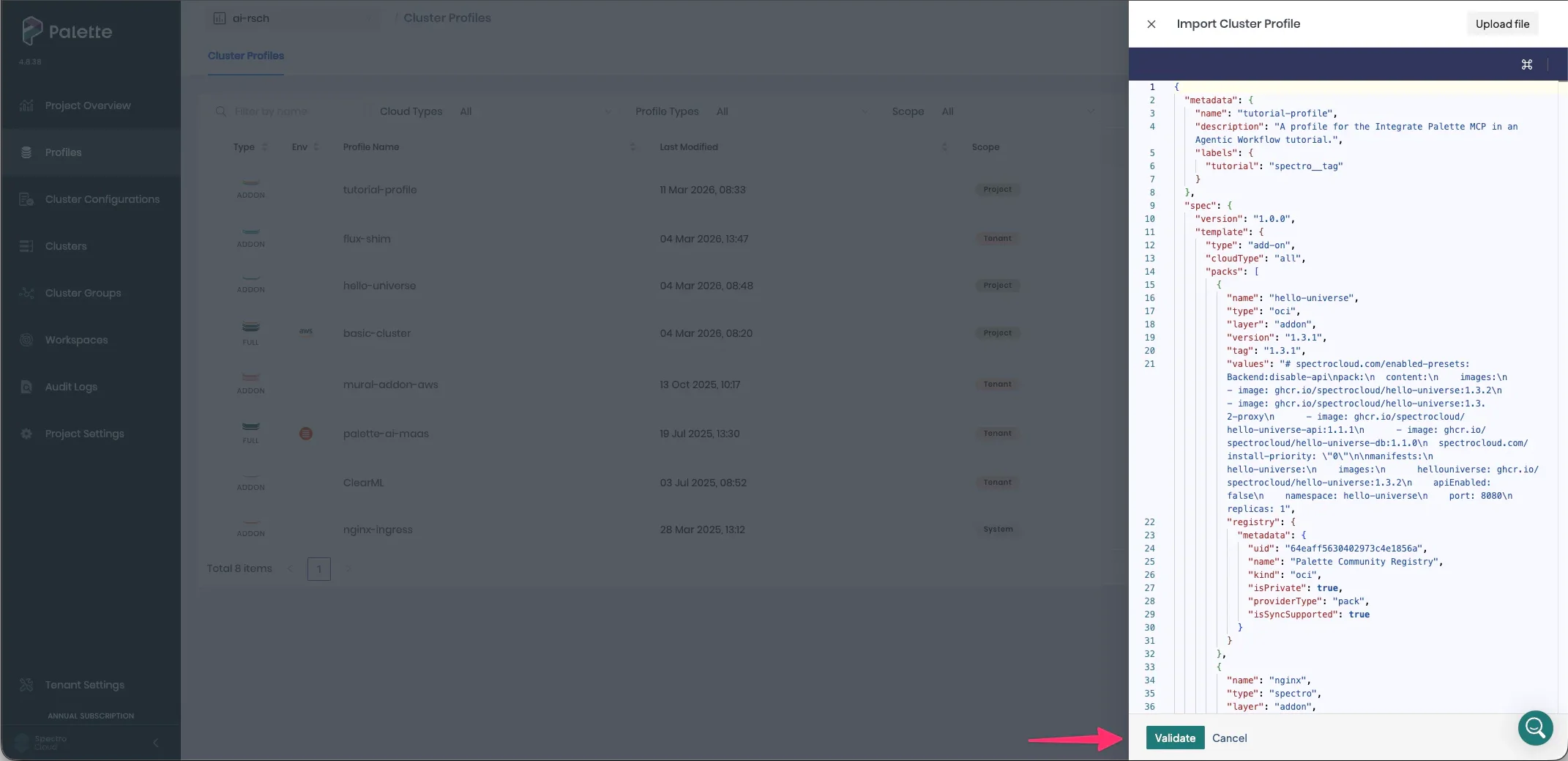
Select Validate and Confirm to create the cluster profile.
Deploy Cluster Profile
Next, deploy the add-on cluster profile to the kind cluster. From the cluster profile list view page, select the row for the tutorial profile. The details page appears. Then, select Deploy.
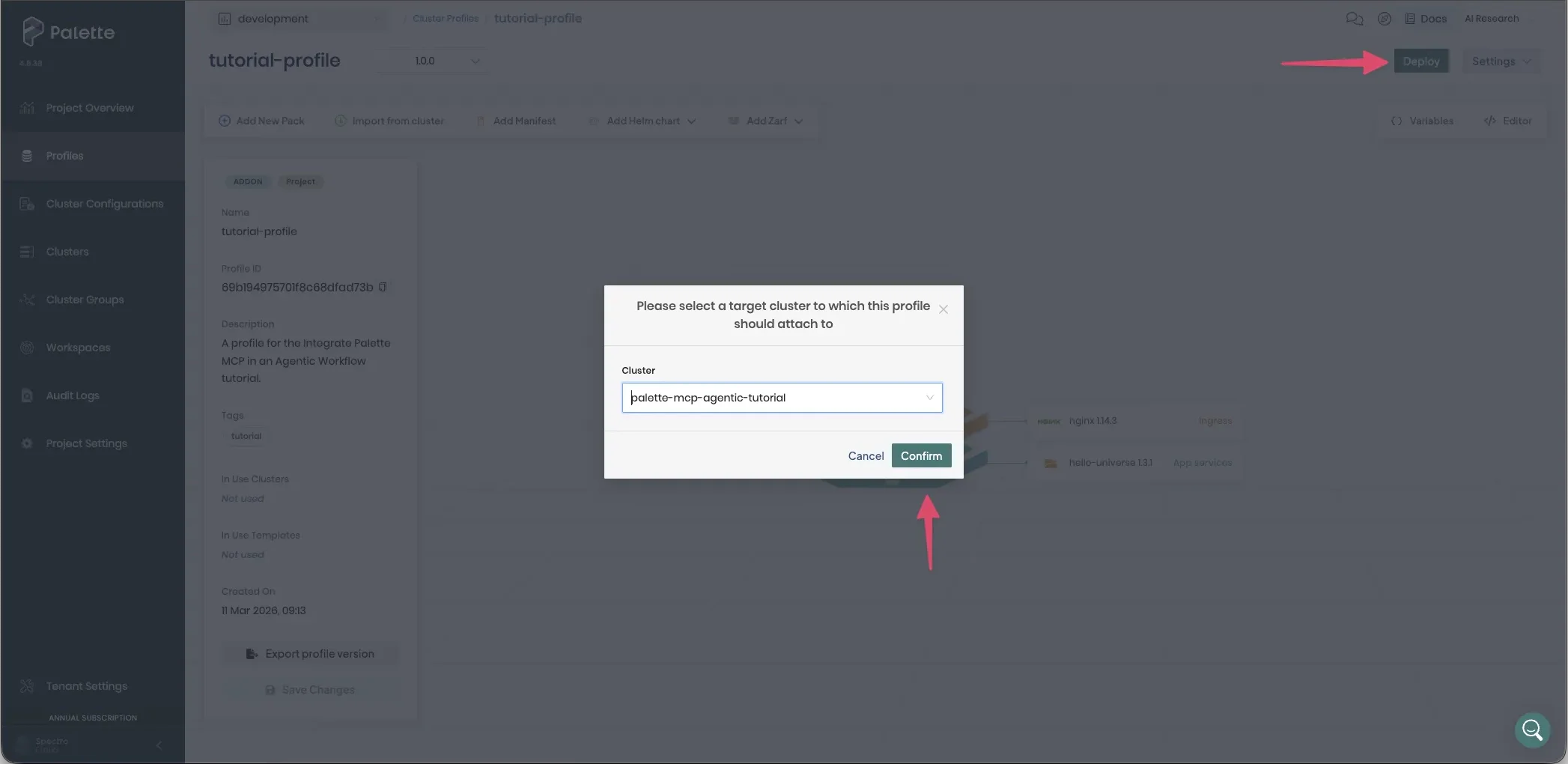
Palette redirects you to the cluster details page. Select Save to deploy the cluster profile. After a few moments, the hello-universe application and Nginx application are deployed. You can verify the pods are in the "running" state by issuing the following command.
kubectl get pods --all-namespaces
NAMESPACE                          NAME                                                                 READY   STATUS    RESTARTS      AGE
cert-manager                       cert-manager-74877f76bd-nwtg7                                        1/1     Running   2 (54m ago)   41h
cert-manager                       cert-manager-cainjector-7f7664d9d8-qkrjg                             1/1     Running   4 (53m ago)   41h
cert-manager                       cert-manager-webhook-75c58f95c4-c267w                                1/1     Running   2 (54m ago)   41h
cluster-69af4d3e45baa7b0b501055a   cluster-management-agent-lite-9d6c5c765-hdltb                        1/1     Running   2 (54m ago)   41h
cluster-69af4d3e45baa7b0b501055a   crony-56c6bc6bdd-fpx6m                                               1/1     Running   3 (54m ago)   41h
cluster-69af4d3e45baa7b0b501055a   palette-lite-controller-manager-56f4f84685-wbq5q                     2/2     Running   0             4m6s
hello-universe                     hello-universe-deployment-7c584458b4-fbkh9                           1/1     Running   0             68s
kube-system                        coredns-674b8bbfcf-8x6k9                                             1/1     Running   2 (54m ago)   42h
kube-system                        coredns-674b8bbfcf-v2q6b                                             1/1     Running   2 (54m ago)   42h
kube-system                        etcd-palette-mcp-agentic-tutorial-control-plane                      1/1     Running   2 (54m ago)   42h
kube-system                        kindnet-nwtf4                                                        1/1     Running   2 (54m ago)   42h
kube-system                        kube-apiserver-palette-mcp-agentic-tutorial-control-plane            1/1     Running   2 (54m ago)   42h
kube-system                        kube-controller-manager-palette-mcp-agentic-tutorial-control-plane   1/1     Running   2 (54m ago)   42h
kube-system                        kube-proxy-jql5v                                                     1/1     Running   2 (54m ago)   42h
kube-system                        kube-scheduler-palette-mcp-agentic-tutorial-control-plane            1/1     Running   2 (54m ago)   42h
kube-system                        metrics-server-5dd7b49d79-gpnlp                                      1/1     Running   3 (54m ago)   41h
local-path-storage                 local-path-provisioner-7dc846544d-s692f                              1/1     Running   3 (54m ago)   42h
nginx                              nginx-ingress-nginx-controller-5567d85c84-jd76d                      1/1     Running   0             68s
palette-system                     palette-webhook-7bf445d996-tdj7j                                     1/1     Running   2 (54m ago)   37h
You may notice that in the cluster details page, the add-on cluster profile remains stuck in a "deploying" state. This is because the Nginx and Hello Universe both deploy Services that expect a LoadBalancer to be provisioned. Kind does not natively support the type, LoadBalancer, so the Services remain in a "deploying" state. You can ignore this and proceed with the tutorial.
Create Agentic Workflow
It's time to start building out the agentic workflow. Open your favorite text editor and navigate to the /agentic-workflow directory.
The following is the directory structure of the agentic workflow, excluding the __pycache__ directory.
.
├── agents
│   ├── __init__.py
│   ├── active_cluster_agent.py
│   ├── palette_profile_agent.py
│   ├── reporter_agent.py
│   └── tagging_agent.py
├── helpers.py
├── main.py
├── pyproject.toml
├── README.md
├── Taskfile.yaml
├── tools.py
└── uv.lock
There are a few key files in the agentic workflow:
main.py- The main entry point for the agentic workflow. This is the starting point for the agentic workflow.tools.py- Custom tools for the agentic workflow. This is where you can add additional custom tools that are not part of an MCP server.agents/palette_profile_agent.py-This agent is responsible for finding the cluster profiles that contain the selected pack.agents/active_cluster_agent.py- This agent is responsible for identifying the active clusters in Palette that are using the cluster profiles that contain the selected pack.agents/reporter_agent.py- This agent is responsible for reporting the results of the agentic workflow.agents/tagging_agent.py- This agent is responsible for tagging the cluster profiles and the active clusters using the cluster profiles with the pack you are looking for.
The agentic workflow is built using the Langchain framework. The workflow consists of four agents, each responsible for a different part.

Two agents interact with the Palette MCP to obtain the information they need to perform their tasks. One agent leverages custom Python logic to perform the tagging of the cluster profiles and the active clusters. The use of custom logic is common when an MCP server does not have a tool that can perform the task the agent needs. The final agent is responsible for reporting the results of the agentic workflow, and it does not require any interaction with the Palette MCP or custom Python logic.
Open each agent Python file and uncomment all code that is commented out. As you uncomment the code, take a moment to
review the comments to gain a deeper understanding. You will notice a pattern of an init function that is used to
initialize the agent and an invoke function that is used to start the agent.
Next, open the main.py file. This is the main entry point for the agentic workflow. Uncomment the code for the main
function and review the code.
Click to expand and view the code for main.py
async def main_async() -> None:
    args = parse_args()
    run_id = uuid.uuid4().hex[:8]
    debug_level = get_debug_level(cli_level=args.log_level)
    ensure_local_prerequisites()

    if not args.pack:
        print(
            "Error: no pack name provided. Use --pack <name> or set the PACK_NAME environment variable.",
            file=sys.stderr,
        )
        sys.exit(1)

    if is_debug_enabled(debug_level, "debug"):
        print(f"Debug level: {debug_level}")
        print(f"Run ID: {run_id}")
        print("Options:")
        print(f"  --pack:                 {args.pack!r}")
        print(f"  --model:                {args.model}")
        print("Initializing MCP client...")

    try:
        mcp_client_module = importlib.import_module("langchain_mcp_adapters.client")
        MultiServerMCPClient = mcp_client_module.MultiServerMCPClient
    except (ImportError, AttributeError):
        mcp_module = importlib.import_module("langchain_mcp_adapters")
        MultiServerMCPClient = mcp_module.MultiServerMCPClient

    mcp_client = MultiServerMCPClient(
        build_palette_server_config(
            default_env_file=DEFAULT_ENV_FILE,
            default_kubeconfig_dir=DEFAULT_KUBECONFIG_DIR,
            default_mcp_image=DEFAULT_MCP_IMAGE,
        )
    )
    hide_mcp_output = debug_level != "verbose"
    with suppress_console_output(hide_mcp_output):
        mcp_tools = await mcp_client.get_tools()

    if is_debug_enabled(debug_level, "debug"):
        print("Initializing profile finder agent...")

    profile_finder_agent = await initialize_profile_finder_agent(
        model=args.model,
        mcp_tools=mcp_tools,
    )
    active_cluster_agent = await initialize_active_cluster_agent(
        model=args.active_cluster_model,
        mcp_tools=mcp_tools,
    )
    tagging_agent = await initialize_tagging_agent(model=args.tagging_model)
    reporter_agent = await initialize_reporter_agent(model=args.reporter_model)

    if is_debug_enabled(debug_level, "debug"):
        print(f"Running profile discovery for pack: {args.pack}")

    profile_discovery_output = await run_with_thinking_indicator(
        invoke_profile_finder_agent(
            profile_finder_agent, args.pack, debug_level, run_id
        )
    )

    if is_debug_enabled(debug_level, "debug"):
        print("Finding active clusters using matched profiles...")

    active_cluster_output = await run_with_thinking_indicator(
        invoke_active_cluster_agent(
            active_cluster_agent,
            args.pack,
            profile_discovery_output,
            debug_level,
            run_id,
        )
    )

    user_tags = prompt_for_tags(profile_discovery_output, active_cluster_output)

    if user_tags is None:
        if is_debug_enabled(debug_level, "debug"):
            print("No matches found. Skipping tagging.")
        tagging_output = '{"skipped": true, "reason": "no matched profiles or active clusters found"}'
    else:
        if is_debug_enabled(debug_level, "debug"):
            if user_tags:
                print(f"Tagging with: {user_tags}")
            else:
                print("No tags entered. Skipping tagging.")
        tagging_output = await run_with_thinking_indicator(
            invoke_tagging_agent(
                tagging_agent,
                args.pack,
                profile_discovery_output,
                active_cluster_output,
                user_tags,
                run_id,
            )
        )

    if is_debug_enabled(debug_level, "debug"):
        print("Formatting report...")

    final_report = await run_with_thinking_indicator(
        invoke_reporter_agent(
            reporter_agent,
            args.pack,
            profile_discovery_output,
            active_cluster_output,
            tagging_output,
            run_id,
        )
    )
    print(final_report)
At a high level, the main function initializes the Palette MCP, the agents, and the tools. It also orchestrates the
workflow by calling the agents in the correct order.
Initialize MCP Overview
In Langchain, you can define an MCP client using the
MultiServerMCPClient class. By default, an MCP server
connection is stateless. This means that the connection is closed after each request. In a production environment, you
may want to consider using a stateful connection by using the
ClientSession class.
mcp_client = MultiServerMCPClient(
    build_palette_server_config(
        default_env_file=DEFAULT_ENV_FILE,
        default_kubeconfig_dir=DEFAULT_KUBECONFIG_DIR,
        default_mcp_image=DEFAULT_MCP_IMAGE,
    )
)
mcp_tools = await mcp_client.get_tools()
The build_palette_server_config function is a helper function that builds the configuration for the Palette MCP. The
function is displayed below for your reference. The function is responsible for starting the Docker container that
contains the Palette MCP.
def build_palette_server_config(
    default_env_file: str,
    default_kubeconfig_dir: str | None,
    default_mcp_image: str,
) -> dict[str, dict[str, Any]]:
    container_runtime = resolve_container_runtime()
    env_file = os.getenv("PALETTE_MCP_ENV_FILE", default_env_file)
    kubeconfig_dir = os.getenv("PALETTE_MCP_KUBECONFIG_DIR") or default_kubeconfig_dir
    mcp_image = os.getenv("PALETTE_MCP_IMAGE", default_mcp_image)

    args: list[str] = ["run", "--rm", "-i"]
    if kubeconfig_dir:
        args += ["--mount", f"type=bind,source={kubeconfig_dir},target=/tmp/kubeconfig"]
    args += ["--env-file", env_file, mcp_image]

    return {
        "palette": {
            "transport": "stdio",
            "command": container_runtime,
            "args": args,
        }
    }
Each agent is passed the Palette MCP client as a tool. Below is an example of the initialize_profile_finder_agent
function receiving the Palette MCP client as a tool.
profile_finder_agent = await initialize_profile_finder_agent(
    model=args.model,
    mcp_tools=mcp_tools,
)
Lastly, inside each agent, the agent is created using the
create_agent function. This is where the agent
is configured with the LLM, tools, system prompt, and response format.
llm = ChatOpenAI(model=model)
    return create_agent(
        model=llm,
        tools=mcp_tools,
        system_prompt=PROFILE_FINDER_SYSTEM_PROMPT,
        response_format=ProfileDiscoveryOutput,
        checkpointer=InMemorySaver(),
    )
The patterns and functions used in this tutorial are one way to achieve the desired outcome. There are other ways to initialize agents and configure tools. Check out the Langchain Agents guide for more in-depth information.
Invoke the Agentic Workflow
Once you have uncommented the code for the main function and all agent files. The last step is set an OpenAI API key
as an environment variable. Use the following command to set the OpenAI API key as an environment variable.
export OPENAI_API_KEY=<your-openai-api-key>
Replace <your-openai-api-key> with your OpenAI API key.
You are now ready to start the agentic workflow. In your terminal, issue the following command.
uv run python main.py --pack nginx --log-level debug
This will start the agentic workflow and search for the Nginx pack in your Palette environment.
Debug level: debug
Run ID: 1e63f40e
Options:
  --pack:                 'nginx'
  --model:                gpt-5.4
Initializing MCP client...
After finding the Nginx pack in your Palette environment, the workflow prompts you to enter the tags you want to apply to the cluster profiles and the active clusters that are using the Nginx pack.
Matches found. Enter tags to apply to matched cluster profiles and active clusters.
Supported formats:
  key:value -> nginx:found, date:2026-03-11
  single -> review
Press Enter with no input to skip tagging.
For example purposes, enter the following tags.
nginx:found, review
Upon completion, the results of the agentic workflow are displayed in your terminal.
1. Summary

Pack `nginx` was found in 3 of 14 scanned cluster profiles. Among 1 active cluster(s) scanned, 1 active cluster(s) were
confirmed to be using one of the matched profiles; tagging succeeded for 1 active cluster and 2 non-system matched
cluster profiles.

2. Matching cluster profiles

- UID: `63dce2a01ffb92baccb5b5c0`
  - Name: `nginx-ingress`
  - Evidence: spec.published.packs includes pack name 'nginx' with version '1.4.0'.
- UID: `696a800dc5e3142e6896220b`
  - Name: `basic-cluster`
  - Evidence: spec.published.packs includes pack name 'nginx' with version '1.14.3'.
- UID: `69b1a33f308084634c14d377`
  - Name: `tutorial-profile`
  - Evidence: spec.published.packs includes pack name 'nginx' with version '1.14.3'.

3. Active clusters using the matched cluster profiles

- UID: `69b1a2b54d0877725c4205e5`
  - Name: `palette-mcp-agentic-tutorial`
  - Cluster profile UID: `69b1a33f308084634c14d377`
  - Cluster profile name: `tutorial-profile`

// ... remaining output removed for brevity ...
Review Results
Return to your web browser session with the Palette UI and navigate to the Cluster Profiles page. Select the cluster
profile you created called tutorial-profile. The cluster profile now has the two tags nginx:found and review.
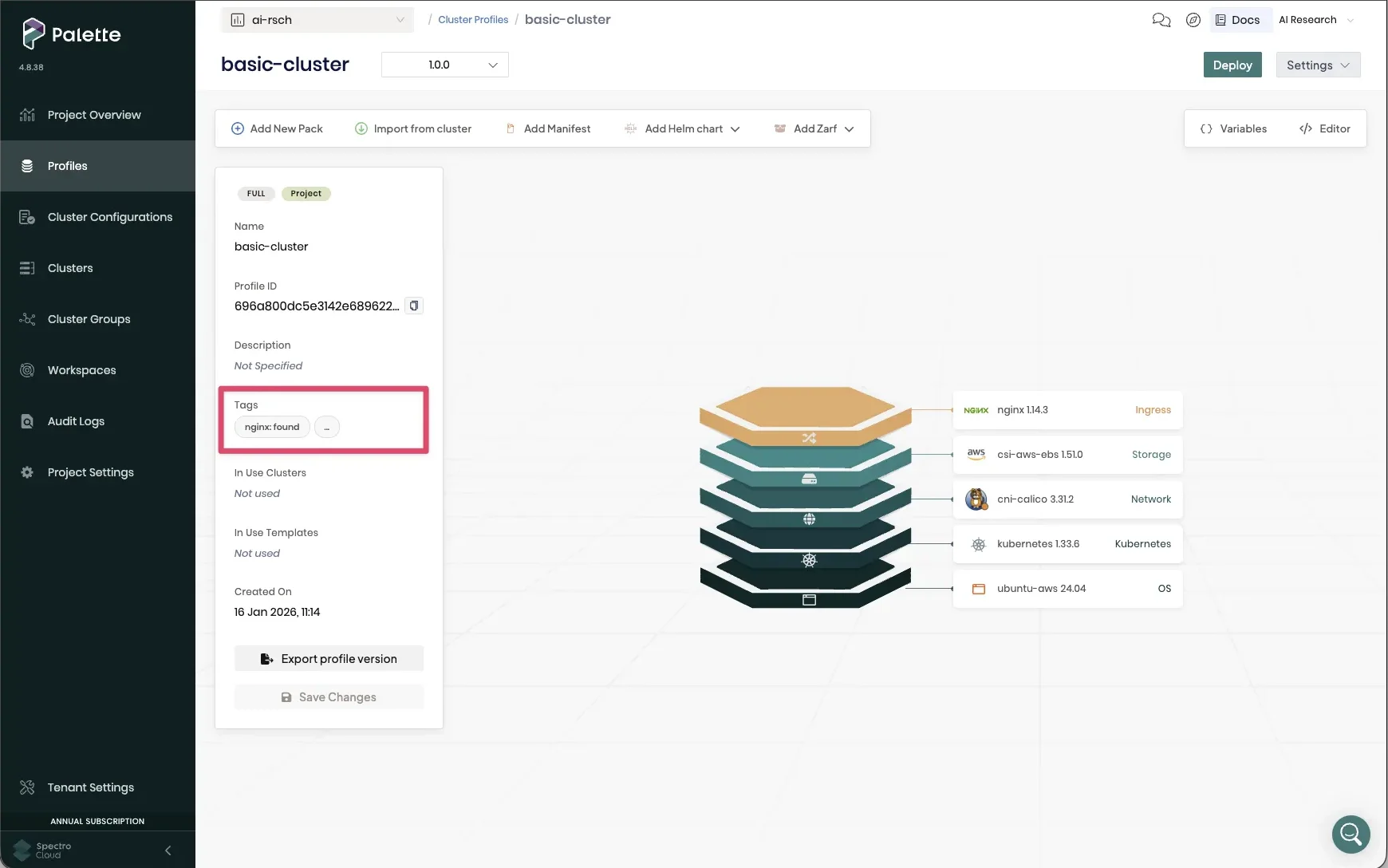
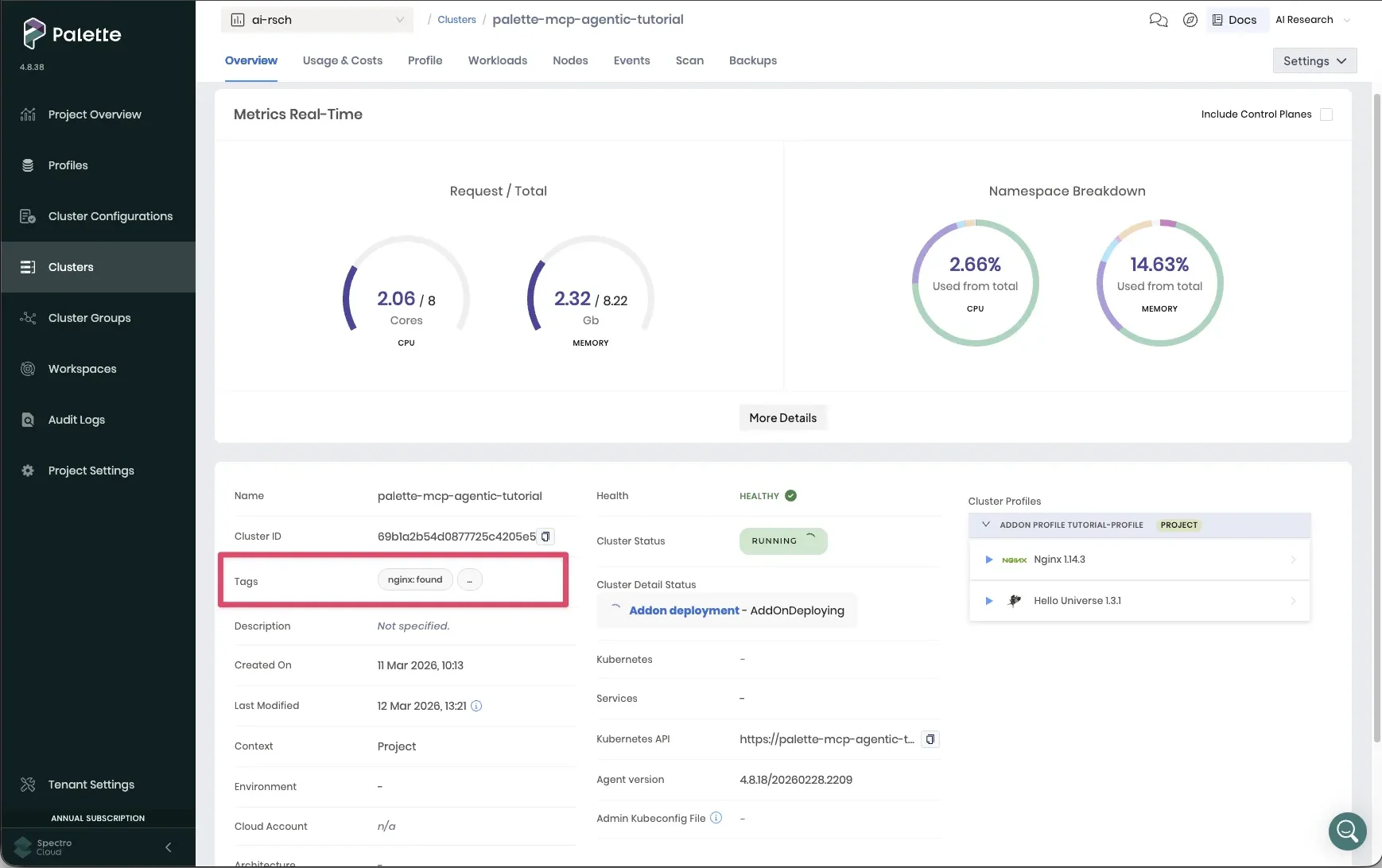
Next, navigate to left main menu and select Clusters. Select the palette-mcp-agentic-tutorial cluster. The
cluster also has the two tags nginx:found and review.
Cleanup
Use the following steps to clean up the resources you created for this tutorial. Start by deleting the cluster you created called palette-mcp-agentic-tutorial. To delete the cluster, navigate to the left main menu and select Clusters. Select the palette-mcp-agentic-tutorial cluster. Then, select Settings > Delete Cluster. Confirm the deletion by entering the cluster name when prompted.
Next, navigate to the left main menu and select Profiles. Select the tutorial-profile cluster profile. Then, select the three-dot menu > Delete. Confirm the deletion by entering the cluster profile name when prompted.
The last step is to delete the Kind cluster you created. Issue the following command in your terminal.
kind delete cluster --name palette-mcp-agentic-tutorial
Deleting cluster "palette-mcp-agentic-tutorial" ... Deleted nodes: ["palette-mcp-agentic-tutorial-control-plane"]
Wrap-up
In this tutorial, you imported a Kind cluster and deployed a cluster profile containing the Hello Universe and Nginx packs onto the cluster. You then created an agentic workflow that searches for a given pack in your Palette environment and tags the cluster profiles and active clusters that are using the pack. In this scenario, you found the Nginx pack in at least one cluster profile and one active cluster.
To achieve this outcome, you used the Langchain framework to create four agents that are responsible for different parts. The most important aspect of this tutorial is that the agents use the Palette MCP server to interact with your Palette environment to find all the cluster profiles and active clusters that are using the specified pack.
Without the Palette MCP server, you would have to implement custom logic to interact with the Palette API to find the cluster profiles and active clusters that are using the pack. This would be more time-consuming but also increase the maintenance burden. By using the Palette MCP, you can instead leverage the power of LLMs and have them perform the required tasks through the Palette MCP server without having to implement custom logic.
You can use the code in this tutorial as a starting point to create your own agentic workflows that leverage the Palette MCP server to interact with your Palette environment. You can craft more complex agentic workflows to solve your business problems by combining the Palette MCP server with custom tools, other MCP servers, and custom logic.