Registries
Palette supports different types of registries that you can add to the platform and use in your cluster profiles. You can add the following types of registries to Palette:
-
Open Container Initiative (OCI) Registries
-
Helm Registries
-
Legacy Pack Registries
We recommend you use OCI registries over Legacy Pack registries.
Palette supports OCI registries that support basic authentication. OCI registries can also be used to store and serve images, Helm Charts, Zarf packages, and Packs. Refer to the OCI Registries resource to learn more about OCI registries.
Scope
Registries are added at the tenant level and are available to all users in the tenant. You can add multiple registries of the same type to Palette. If you are using a self-hosted Palette instance, or Palette VerteX, you can add registries through the system console. Registries added through the system console are available to all tenants in the system. Check out the Self-Hosted Add Registry guide or the VerteX Add Registry guide.
Synchronization
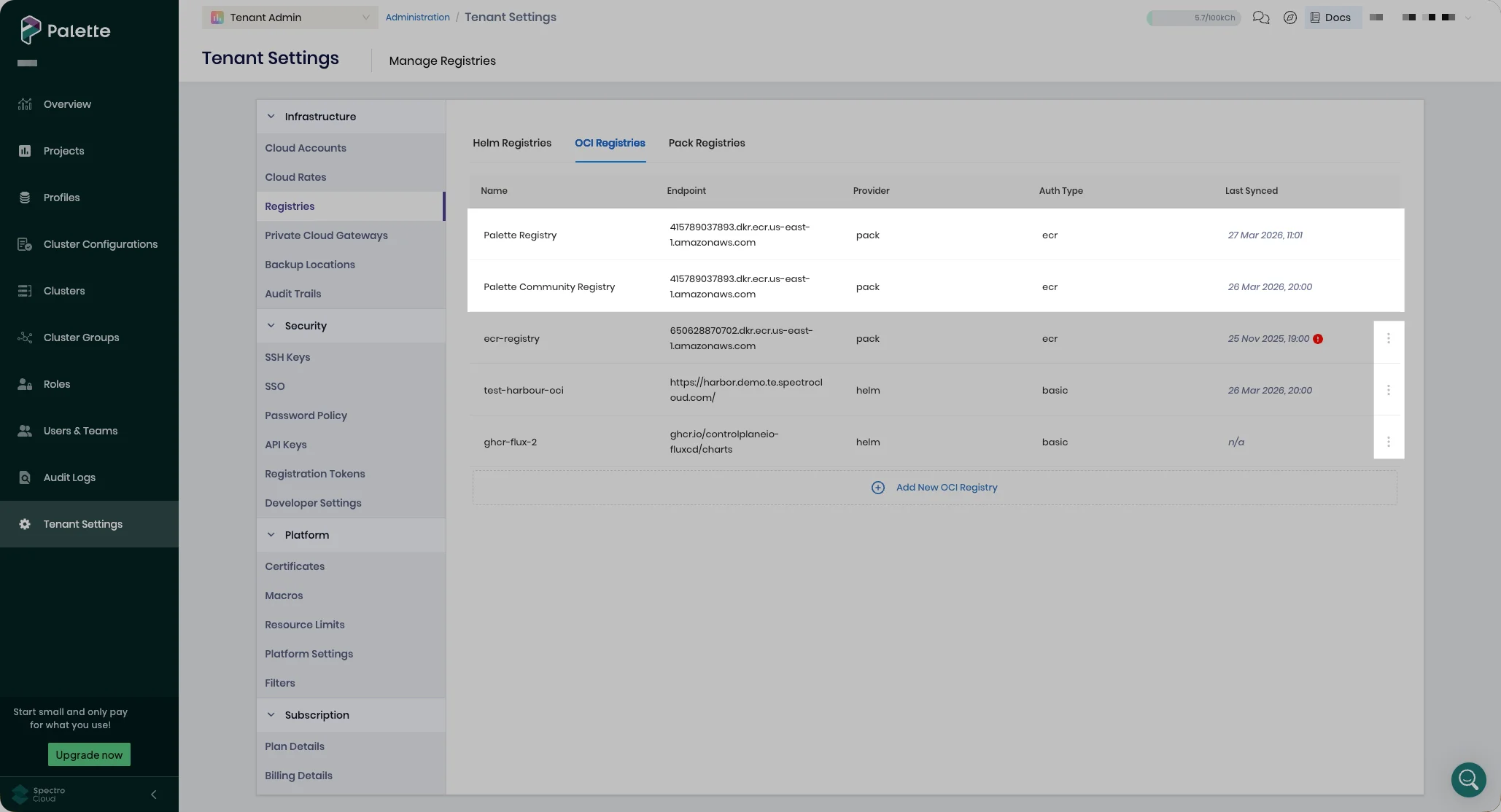
Registries are automatically synchronized with Palette every 24 hours and can also be synced manually from the Tenant Admin scope (Tenant Settings > Registries > three-dot menu > Sync). You can interrupt and restart an ongoing synchronization process using the Force sync option if the synchronization has been in progress for at least one hour.
Automatic synchronization is optional for Helm registries. When you disable synchronization, you must manually synchronize the Helm registry with Palette. Refer to Helm Registry to learn more about the synchronization behavior of Helm registries.
Default Registries
Palette comes with a set of default registries that are available to SaaS tenants and non-airgap self-hosted Palette environments. The default registries for Palette and Palette VerteX are listed in the following table.
| Name | Provider | Description | URL | Base Path | Palette | Palette VerteX |
|---|---|---|---|---|---|---|
| Bitnami | Helm | A Helm Chart registry containing Helm Charts maintained and supported by Bitnami. | https://charts.bitnami.com/bitnami | - | ✅ | ❌ |
| Public Spectro Helm Repo | Helm | A Helm Chart registry containing Helm Charts maintained and supported by us. | https://spectrocloud.github.io/helm-charts | - | ✅ | ❌ |
| Public Repo | Legacy Packs | A packs registry containing packs maintained and supported by us. | https://registry.spectrocloud.com | - | ✅ | ❌ |
| Spectro Addon Repo | Legacy Packs | A packs registry containing add-on packs maintained and supported by us. | https://registry-addon.spectrocloud.com | - | ✅ | ❌ |
| Palette Registry | OCI | A packs registry containing packs maintained and supported by us. | 415789037893.dkr.ecr.us-east-1.amazonaws.com | production | ✅ | ❌ |
| Palette Registry FIPS | OCI | A packs registry containing FIPS packs maintained and supported by us. | 415789037893.dkr.ecr.us-west-2.amazonaws.com | production-fips | ❌ | ✅ |
| Palette Community Registry | OCI | A packs registry containing community packs. | 415789037893.dkr.ecr.us-east-1.amazonaws.com | community | ✅ | ❌ |
-
Palette VerteX comes with a default OCI registry that only contains FIPS compliant packs. Non-FIPS compliant packs are not available in Palette VerteX by default and must explicitly be added to Palette VerteX. Refer to the Use non-FIPS Packs guide to learn how to add non-FIPS packs registries to Palette VerteX.
-
The Public Spectro Helm Repo is deprecated. Customers using packs from the Public Spectro Helm Repo in their clusters should migrate to packs from a supported repository.
Default registries cannot be edited. If there is not a three-dot menu beside the registry located at Tenant Settings > Registries, it is a default registry. A registry can only be edited through the three-dot menu if it is added manually. In the following image, the Palette Registry and Palette Community Registry are default registries in Palette SaaS; the other registries were added manually.