Deliver Kubernetes and Agent Binaries via systemd Extensions
Starting with CanvOS 4.10, Edge clusters in appliance mode can use systemd extensions to deliver Kubernetes and Palette agent binaries at runtime instead of embedding them in the provider image. This reduces provider image size and lets a single provider image serve multiple Kubernetes versions on the same host. This capability applies to appliance mode Edge clusters in both connected and airgapped environments.
How systemd Extensions Work
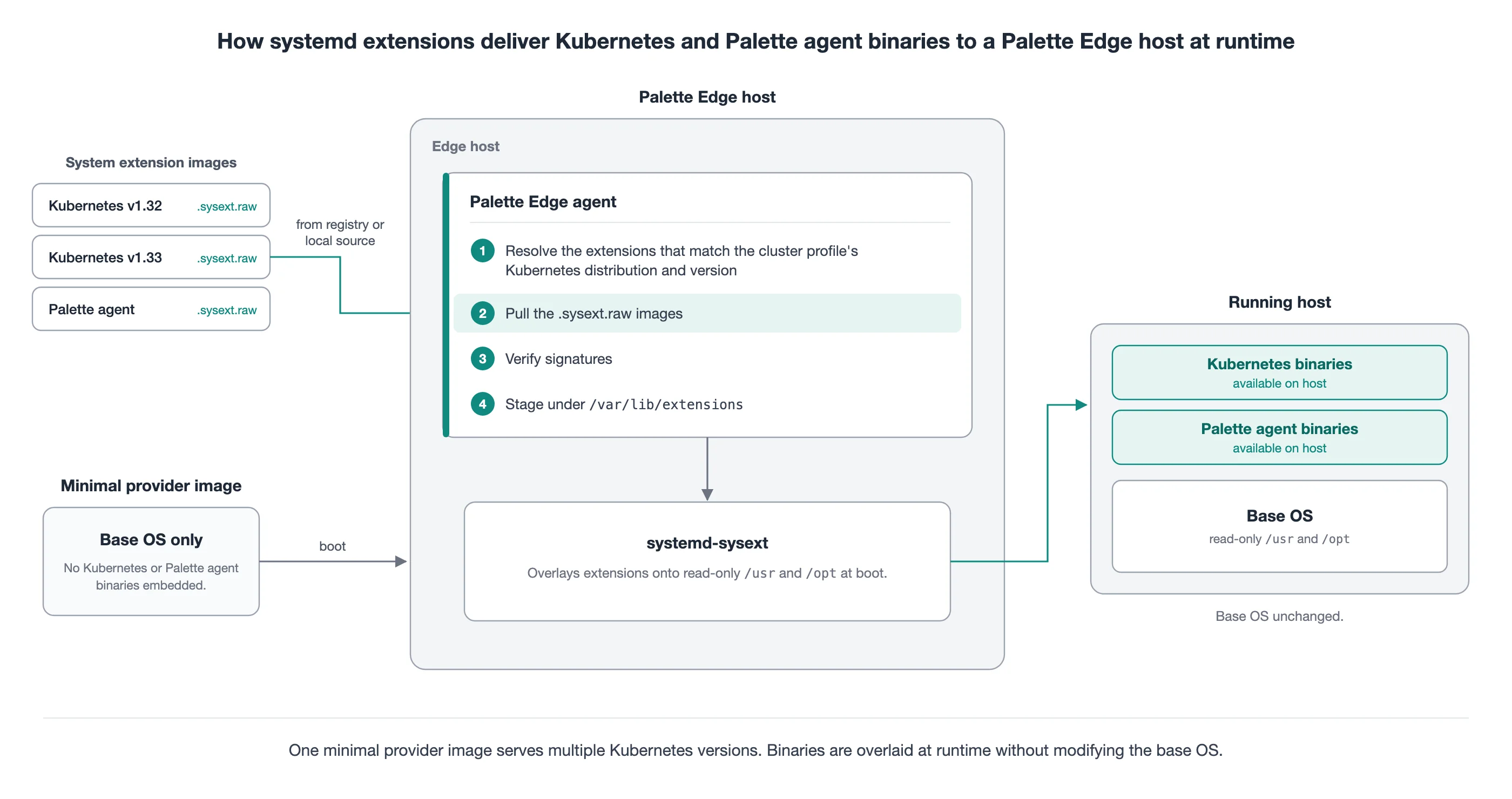
With systemd extensions, the provider image no longer carries the Kubernetes and Palette agent binaries. Palette
packages each component as a system extension image (a .sysext.raw file), and the Palette Edge agent applies it to the
host at runtime.
When the host boots, the Palette Edge agent resolves the extensions that match the Kubernetes distribution and version
in your cluster profile. It pulls each extension, verifies its signature, and stages it under /var/lib/extensions. The
systemd-sysext service then overlays the extensions onto the read-only /usr and /opt directories, so the
Kubernetes and Palette agent binaries become available on the host without modifying the base operating system.
To change the Kubernetes version, update the Kubernetes pack in the cluster profile. The Palette Edge agent applies the matching extension during the upgrade.
Support Requirements
- Palette Edge agent 4.10.13 or later on the cluster. When the Palette Edge agent is pinned to an earlier release, systemd extensions are not available on the cluster regardless of the operating system or Kubernetes pack settings, and the cluster falls back to the pre-systemd-extensions behavior.
- An operating system with systemd version 255 or later. Ubuntu 24 and RHEL 10 are the tested and verified operating systems, and any operating system with systemd 255 or later is supported.
- CanvOS 4.10.3 or later to build provider images for clusters that use systemd extensions. Refer to Build Provider Images.
- Palette delivers all supported Kubernetes distributions through systemd extensions. In airgapped environments, RKE2 is supported starting with Palette 4.10.25. Earlier releases do not support systemd-extension delivery for RKE2 in airgapped environments.
Unified Kernel Image (UKI) deployments and two-node clusters do not support systemd extensions. Refer to Unified Kernel Image (UKI) Considerations and Two-Node Cluster Considerations for the behavior on those hosts.
Airgapped clusters that pull their Kubernetes packs from an external registry, such as Zot, do not support systemd extensions when you populate that registry with pack bundles from Artifact Studio. These pack bundles do not include the systemd extension images, so the Palette Edge agent cannot pull them from the registry.
Build Provider Images
The CanvOS BUNDLE_K8S_AND_AGENT_PROVIDER argument controls whether a provider image includes the Kubernetes and
Palette agent binaries.
| Value | Provider Image Contents |
|---|---|
true (default) | The provider image includes the Kubernetes and Palette agent binaries. |
false | On an operating system with systemd 255 or later, the provider image does not include the Kubernetes and Palette agent binaries, and Palette delivers them through systemd extensions. On an earlier systemd version, the image includes them. |
To build a provider image for a cluster that uses systemd extensions, add the following line to the .arg file. Refer
to Edge Artifact Build Configurations for the other build arguments.
BUNDLE_K8S_AND_AGENT_PROVIDER=false
The argument applies only to provider images and does not affect the installer ISO.
After a cluster moves to systemd extensions, it cannot switch back to a provider image that includes the Kubernetes and
Palette agent binaries. Build every later provider image for the cluster with BUNDLE_K8S_AND_AGENT_PROVIDER=false.
New Clusters
When you provision a new appliance mode Edge cluster on an operating system with systemd 255 or later, set
system.uri: NA in the BYOOS pack. Palette does not need a provider image to deliver Kubernetes and Palette agent
binaries when systemd extensions are available.
Move an Existing Cluster to systemd Extensions
Complete the following steps in order. On PXK-E and Canonical clusters, move your containerd settings to drop-in files before you change the Kubernetes pack version. RKE2 and K3s clusters skip the steps marked for PXK-E and Canonical. Refer to Container Runtime Configuration for details.
-
Build a provider image with a supported CanvOS release. Keep
BUNDLE_K8S_AND_AGENT_PROVIDERat its default value,true. Refer to Support Requirements for the minimum CanvOS release. -
Set
system.uri: <provider-image>in the BYOOS pack, and then apply the profile change to the cluster. This upgrade replaces thekairos-agenton the system with the aligned Palette agent version. The cluster moves to systemd extensions in step 6. -
(PXK-E and Canonical only) Establish an SSH connection to an Edge host in the cluster, and then record the current containerd configuration and the systemd drop-in files.
sudo cat /etc/containerd/config.toml
sudo ls --format=long /etc/containerd/conf.d/
sudo ls --format=long /etc/containerd/certs.d/
sudo ls --format=long /etc/systemd/system/containerd.service.d/
sudo ls --format=long /etc/systemd/system/kubelet.service.d/ -
(PXK-E and Canonical only) Identify the settings that you added to
/etc/containerd/config.toml, such asregistry.config_pathand custom runtime handlers. The table in Container Runtime Configuration lists the settings that most clusters add. -
(PXK-E and Canonical only) In the Kubernetes layer of the cluster profile, change the stage that writes
/etc/containerd/config.tomlso that it writes only those settings to a drop-in file under/etc/containerd/conf.d/. Do not copy the wholeconfig.tomlfile. Refer to Container Runtime Configuration for an example. -
Set
system.uri: NAin the BYOOS pack, update the Kubernetes pack in the cluster profile to the target version, and then apply the profile change to the cluster. Palette delivers the new Kubernetes binaries through systemd extensions, and each node repaves and reboots. -
(PXK-E and Canonical only) After the upgrade, confirm that your containerd settings still apply, for example, that image pulls through your registry mirrors succeed and that workloads that use a custom runtime handler start.
If the host had custom files in
/etc/systemd/system/containerd.service.d/or/etc/systemd/system/kubelet.service.d/and your Palette version is earlier than 4.10.25, refer to Custom systemd Drop-In Files Do Not Apply After Migration to systemd Extensions to restore them.
Upgrade a Cluster That Uses systemd Extensions
Each of the following changes repaves and reboots every node in the cluster.
Upgrade Kubernetes
-
Set
system.uri: NAin the BYOOS pack. -
Update the Kubernetes pack in the cluster profile to the target version.
-
Apply the profile change to the cluster.
Palette delivers the new Kubernetes binaries through systemd extensions.
Patch the Operating System
-
Build a new provider image with
BUNDLE_K8S_AND_AGENT_PROVIDER=false. Refer to Build Provider Images. -
Set
system.uriin the BYOOS pack to the new provider image. -
Apply the profile change to the cluster.
Patch the Operating System and Upgrade Kubernetes
-
Build a new provider image with
BUNDLE_K8S_AND_AGENT_PROVIDER=false. Refer to Build Provider Images. -
Set
system.uriin the BYOOS pack to the new provider image. -
In the same cluster profile revision, update the Kubernetes pack to the target version.
-
Apply the profile change to the cluster.
Both changes apply with one repave and one reboot of each node. If you make the changes in two separate revisions, each node repaves and reboots twice.
Container Runtime Configuration
This section applies to PXK-E and Canonical clusters, with or without systemd extensions. RKE2 and K3s manage containerd
themselves and write their own containerd configuration under /var/lib/rancher/, so RKE2 and K3s clusters need no
changes.
Do not write a complete /etc/containerd/config.toml file from the cluster profile. A complete file replaces the
containerd configuration that Palette ships, including settings such as the containerd root directory and the runc
binary path. It also stops matching the shipped configuration when an upgrade changes it. On PXK-E clusters that use
systemd extensions, the shipped configuration moves to /usr/lib/containerd/config.toml. On those clusters, containerd
does not read /etc/containerd/config.toml, so a complete file there has no effect.
Put your custom settings in their own drop-in files under /etc/containerd/conf.d/ instead. The containerd runtime
reads this directory with and without systemd extensions, so a drop-in file works both before and after you move a
cluster to systemd extensions, and it persists through Kubernetes pack updates.
Follow these rules for each drop-in file:
- Use
version = 2and theio.containerd.grpc.v1.criplugin key, the same as the main configuration file. Drop-in files that use configuration version 3 or 4 are not compatible with the version 2 main file. - If the cluster uses image mirrors or a private registry, set
config_path = "/etc/containerd/certs.d"in the[plugins."io.containerd.grpc.v1.cri".registry]table. The containerd configuration that Palette ships reads/etc/containerd/conf.d/but not/etc/containerd/certs.d/. Without this setting, the mirror rules in/etc/containerd/certs.d/stop applying.
The following example adds a drop-in file through a stage in the Kubernetes layer of the cluster profile.
stages:
  initramfs:
    - name: "Manage containerd config"
      files:
        - path: /etc/containerd/conf.d/registry-config-path.toml
          permissions: 0644
          owner: 0
          group: 0
          content: |-
            version = 2
            [plugins."io.containerd.grpc.v1.cri".registry]
              config_path = "/etc/containerd/certs.d"
Move the following settings to a drop-in file if your cluster uses them.
| Setting | Result If the Setting Stays in /etc/containerd/config.toml |
|---|---|
Image mirror rules in /etc/containerd/certs.d/, as described in Disable Webhook to Customize Image Pull Behavior | Image pulls stop using the mirrors. |
The device_ownership_from_security_context setting from the Migrate a VM to a VMO cluster using the Palette CLI prerequisites | The setting stops applying. |
| Runtime handlers, such as the NVIDIA container runtime for GPU workloads | The runtime handler is not available to workloads. |
Unified Kernel Image (UKI) Considerations
Edge hosts that use Unified Kernel Images do not support systemd extensions. These hosts continue to receive Kubernetes and Palette agent binaries embedded in the provider image, which you build from a supported CanvOS release for every upgrade. Sign the provider image with the same keys that you used to sign the installer. A mismatch causes the host to reject the image at boot.
Two-Node Cluster Considerations
Two-node clusters do not support systemd extensions. These clusters continue to receive Kubernetes and Palette agent binaries embedded in the provider image, which you build from a supported CanvOS release for every upgrade.