Architecture
Canonical MAAS is an open source tool that lets you discover, commission, deploy and re-deploy operating systems to physical servers. The following are some architectural highlights of bare-metal Kubernetes clusters that Palette deploys using Canonical MAAS. Refer to the PCG deployment options section below to learn more about PCG deployment.
-
Palette integrates with MAAS through Spectro Cloud’s open source Cloud Native Computing Foundation (CNCF) Cluster API provider. Refer to the table below.
-
Palette provides a cloud-like experience for deploying clusters on MAAS-managed bare-metal servers or on Linux Container Daemon (LXD) virtual machines created by MAAS. Bare metal typically provides near-native performance, while LXD VMs improve consolidation and resource utilization with minimal additional overhead.

-
A Private Cloud Gateway (PCG) that you install in a MAAS cloud using a local installer facilitates communication between Palette and MAAS. The PCG is necessary in MAAS environments where Palette does not have direct network access to the MAAS server. Since MAAS environments are typically in a private network without a central endpoint, the PCG provides this endpoint and also wraps the MAAS environment into a cloud account that you can target for cluster deployment in Palette. Refer to the section below to learn about the PCG deployment options you have.
-
Support for static IP addresses is available through IP Pools provisioned in the PCG.
-
Dynamic Host Configuration Protocol (DHCP) is also supported. If you are using DHCP, dynamic DNS is required.
-
When the PCG is installed, it registers itself with a Palette instance and enables secure communication between the SaaS portal and the private cloud environment. The gateway enables installation and end-to-end lifecycle management of Kubernetes clusters in private cloud environments from Palette's SaaS portal.
The following diagram illustrates how MAAS works with Palette using a PCG.
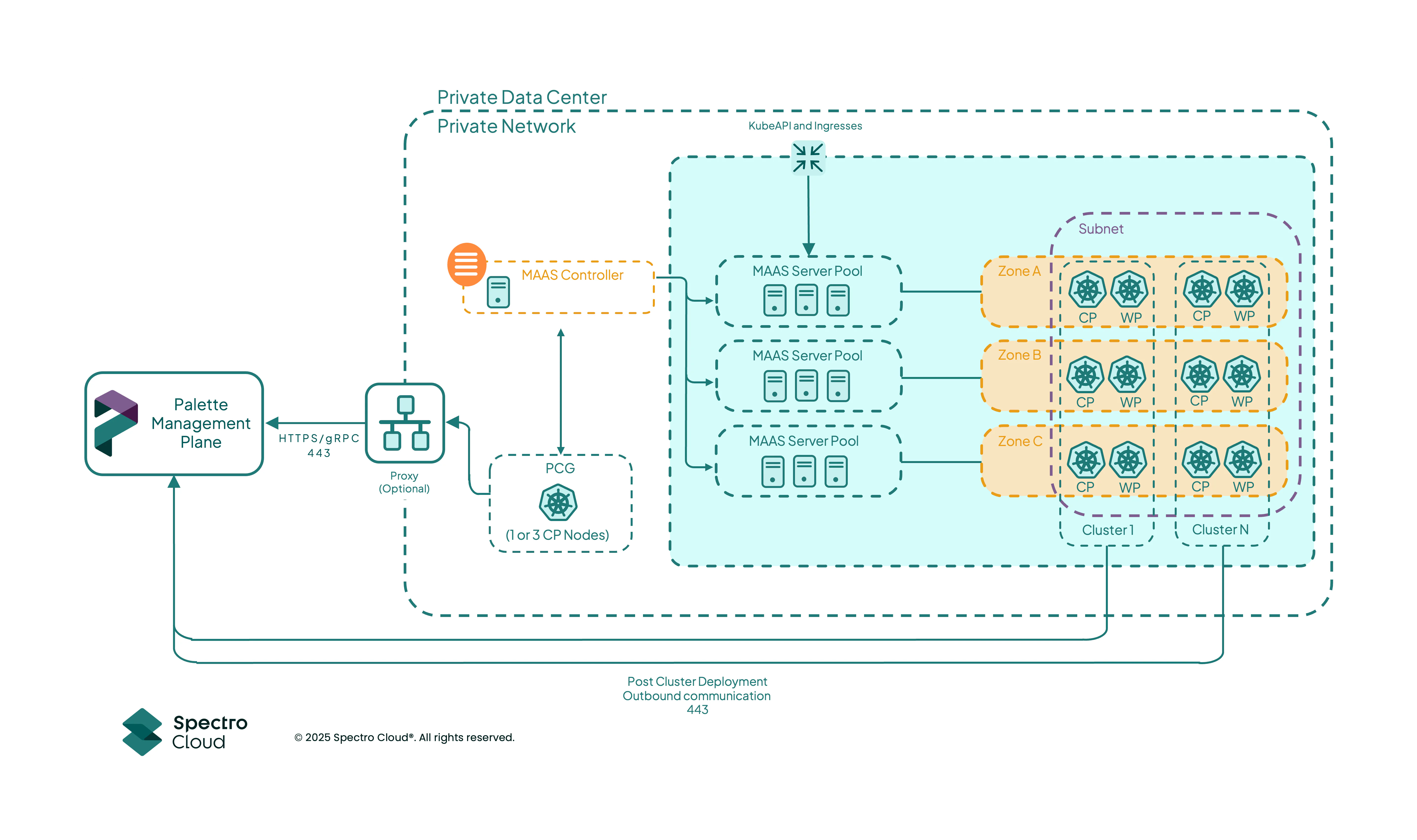
Refer to the PCG Architecture section to learn more about the PCG architecture.
-
You can deploy OpenShift workload clusters on MAAS by using a HyperShift host cluster. The HyperShift host cluster is used to host control planes as pods for the OpenShift workload clusters. The following diagram illustrates how HyperShift and OpenShift work with Palette and MAAS.
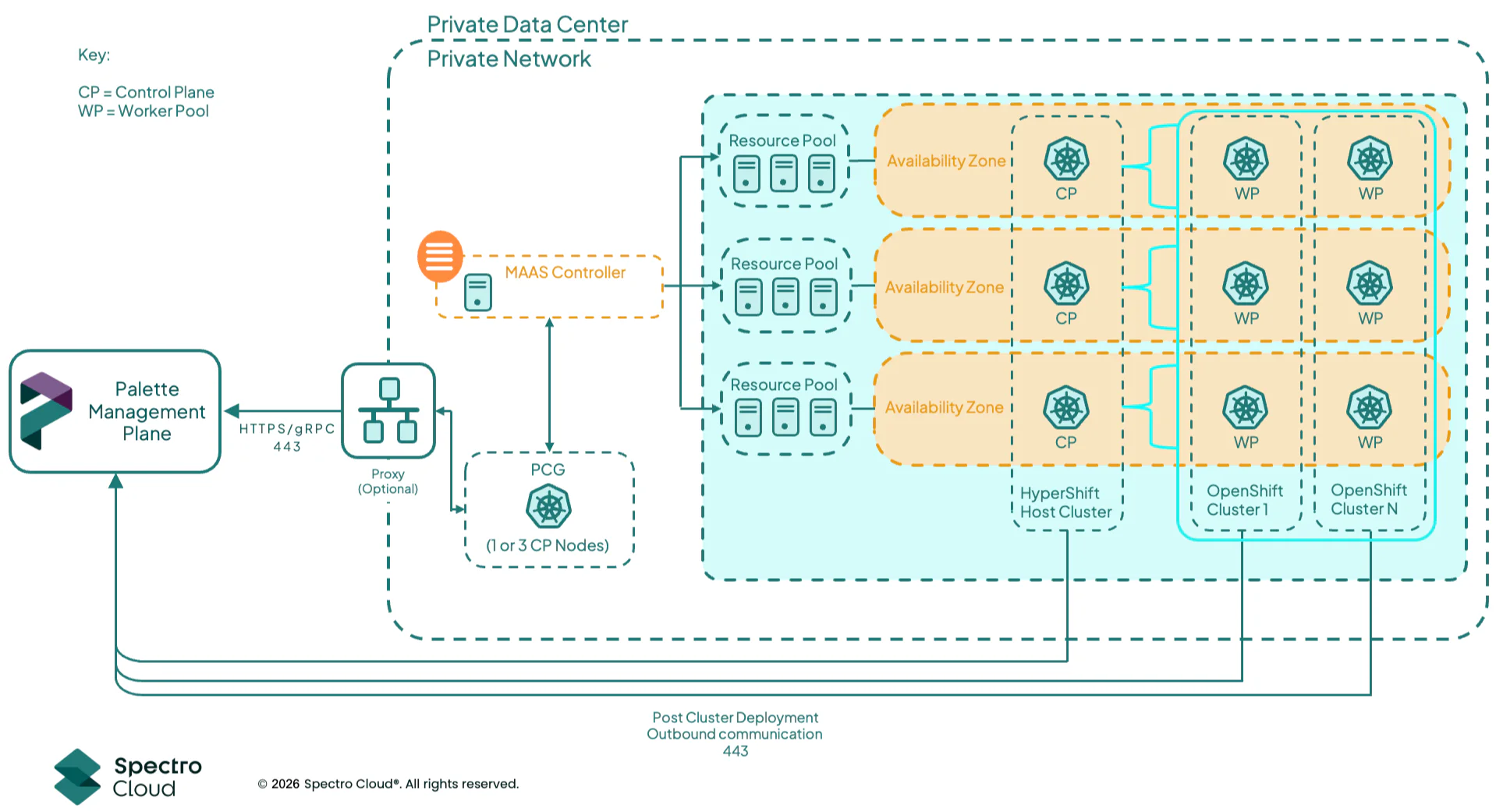
Refer to the Create and Manage MAAS OpenShift Clusters with HyperShift guide for more information.
Limitations
Canonical Kubernetes Pack Limitations
The Canonical Kubernetes pack for deployments in MAAS environments does not support the following:
- OpenID Connect (OIDC)
- Deploying MAAS clusters with LXD VMs
- The Cilium pack is available as a Container Network Interface (CNI) for Canonical Kubernetes 1.35 and later. For configuration steps, refer to Configure Cilium for Canonical Kubernetes Clusters on MAAS.
Palette MAAS Distribution
Palette provides the following distributions for MAAS environments.
| Name | Kubernetes Distribution | OS | CNIs | CSIs |
|---|---|---|---|---|
| Palette eXtended Kubernetes (PXK) | CNCF | Ubuntu, BYOOS | Multiple. Refer to the pack information for the details. | Multiple. Refer to the pack information for the details. |
| Canonical Kubernetes | Canonical Kubernetes | Ubuntu for Canonical Kubernetes | Cilium CNI (Canonical Kubernetes) | Portworx |
| OpenShift | OpenShift Container Platform | BYOOS | OVN-Kubernetes CNI (passthrough) | Local Path Provisioner |
The OpenShift pack for deployment in MAAS environments is a Tech Preview feature and is subject to change. Do not use this feature in production workloads.
SSH Keys on MAAS Cluster Nodes
When you configure SSH Keys on a MAAS cluster's cloud configuration, Palette injects the public keys into
~/.ssh/authorized_keys for the Palette-managed spectro user on every control plane and worker node in the cluster.
This applies to clusters that use the following distributions:
- Palette eXtended Kubernetes (PXK)
- Canonical Kubernetes (CK8s)
- HyperShift host clusters, which are PXK MAAS clusters and inherit the same behavior
Configuring SSH Keys through Palette does not remove or modify default or existing users on the MAAS node image, for
example, the built-in ubuntu user on Ubuntu MAAS images. Palette preserves those users, along with any keys that MAAS
or the machine image configured for them.
On a Canonical Kubernetes cluster, changing SSH Keys after the cluster is deployed repaves the cluster nodes. Refer to Day-2 SSH Key and NTP Changes on Canonical Kubernetes Clusters for more information.
SSH Access on OpenShift Workload Clusters
OpenShift workload clusters hosted by a HyperShift host cluster are provisioned through HyperShift's HostedCluster and
NodePool custom resources on Red Hat Enterprise Linux CoreOS (RHCOS), not through Palette's cloud-init injection path.
SSH access to those nodes is governed by OpenShift and RHCOS mechanisms rather than by the cluster's SSH Keys field.
NTP Servers on MAAS Cluster Nodes
When you configure NTP Servers on a MAAS cluster's cloud configuration, Palette applies the servers to every control plane and worker node in the cluster. This applies to clusters that use the following distributions:
- Palette eXtended Kubernetes (PXK)
- Canonical Kubernetes (CK8s)
- HyperShift host clusters, which are PXK MAAS clusters and inherit the same behavior
The servers you specify replace the NTP configuration that MAAS provides to the node. We recommend specifying at least one NTP server to prevent time drift issues.
If you remove every server from the list on a Canonical Kubernetes cluster, its nodes fall back to the default NTP pools
of the node operating system, for example 0.ubuntu.pool.ntp.org through 3.ubuntu.pool.ntp.org. They do not return to
the NTP server that MAAS provides.
On a Canonical Kubernetes cluster, changing NTP Servers after the cluster is deployed repaves the cluster nodes. Refer to Day-2 SSH Key and NTP Changes on Canonical Kubernetes Clusters for more information.
NTP on OpenShift Workload Clusters
OpenShift workload clusters hosted by a HyperShift host cluster do not consume the cluster's NTP Servers field.
Their nodes are provisioned through HyperShift's HostedCluster and NodePool custom resources on RHCOS rather than
through Palette's cloud-init path, so time synchronization on those nodes is governed by OpenShift and RHCOS mechanisms.
Day-2 SSH Key and NTP Changes on Canonical Kubernetes Clusters
Palette injects the SSH Keys and NTP Servers values from a cluster's cloud configuration into the bootstrap configuration of each Canonical Kubernetes (CK8s) node. When you change either value on a deployed CK8s cluster, the node configuration that Palette generates no longer matches the configuration of the running nodes, and Palette repaves the cluster to reconcile the difference.
The repave replaces the control plane nodes and the nodes in every worker pool. Palette replaces nodes one at a time so that the cluster remains available for the duration of the operation. As with any repave, Palette requires your approval before the operation starts. Refer to Repave Behavior and Configuration to learn how repaves proceed and how to approve them.
Plan SSH Keys and NTP Servers changes on a deployed Canonical Kubernetes cluster in the same way you plan a Kubernetes version upgrade. Every node in the cluster is replaced.
Palette does not repave the cluster in the following cases:
-
You save the cloud configuration without changing the SSH Keys or NTP Servers values. Palette compares the node configuration it generates against the configuration of the running nodes and takes no action when the two match.
-
You use an auto-generated SSH key and do not regenerate it. Palette reuses the stored public key each time it evaluates the cluster, so the node configuration remains unchanged. Regenerating the key produces a new public key, which does repave the cluster.
-
You have not configured SSH Keys or NTP Servers on the cluster. Palette repaves the cluster only in response to a change in these values.
Custom API Server Endpoint for MAAS Clusters
By default, Palette registers a DNS record in MAAS for the deployed cluster and links it to the IP addresses of the control plane nodes of the cluster. However, you may choose not to depend on MAAS for your cluster DNS record. The Kubernetes pack allows you to configure a custom API server endpoint for your cluster instead.
This feature is only supported in Palette eXtended Kubernetes (PXK). Refer to the Custom API Server Endpoint for MAAS Clusters section of the pack Additional Guidance for further information.