Cert Manager Add-On
The Cert Manager pack automates the process of issuing, renewing, and managing TLS certificates for application and ingress workloads. These certificates can either be self-signed or sourced from certificate authorities, such as Let's Encrypt and HashiCorp Vault. Cert Manager also supports both standard and wildcard certificates.
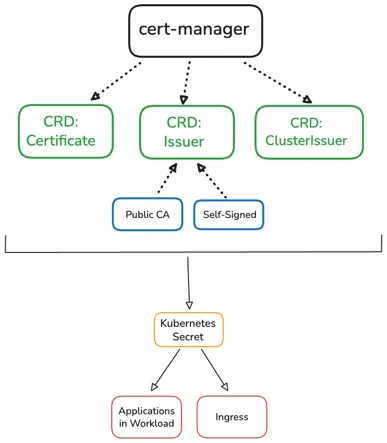
The architecture is divided between three main components: Issuer, ClusterIssue and Certificate. CRD: Issuer
determines who to request a certificate from and how to request that certificate for a specific namespace. The
CRD: ClusterIssuer addresses certificate requests at the cluster level. CRD: Certificate determines which
certificate, secret name, and DNS are to be used at a namespace level.
Cert Manager requests a certificate when Issuer or ClusterIssuer are created. The key and certificate are then
stored in a Kubernetes secret. Cert Manager monitors the certificate expiration and does automatic renewals before the
certificate expires as necessary.
Supported Cluster Types
- Public Cloud
- Infrastructure as a Service (IaaS):
- AWS
- Azure
- GCP
- Datacenter
- MAAS
- Nutanix
- OpenStack
- CloudStack
- VMware
- Infrastructure as a Service (IaaS):
Limitations
- Cert Manager customizations are only supported in clusters running Palette agent version 4.8.9 or later.
Enablement
-
Log in to Palette.
-
From the left main menu, select Clusters. Select the cluster you want to provision the Cert Manager on.
-
Select the Profile tab and select the profile your selected cluster is using.
-
From the version drop-down menu, select Create new version.
-
Enter the semantic version number you wish to use for the updated profile and select Confirm.
-
Select Add New Pack. The search field appears.
-
Search for and select the Cert Manager pack. Ensure that you are selecting version 1.19.1 or later.
-
Click Confirm your changes.
-
Leave the default values for the Cert Manager pack and select Confirm & Create on the pack customization screen.
warningYou can do customizations, however, the following must be adhered to:
crds.enabledis set tofalse.cainjector.enabledis set tofalseorcainjector.replicasis set to0.nodeSelectorornodeAffinityis set to prevent scheduling of Cert Manager on control pane nodes.
-
The profile overview screen reflects that the
cert-managerpack is now part of your cluster profile. Select Save Changes. -
From the left main menu, select Clusters. Select the cluster to update.
-
Select the Profile tab.
-
From the applicable Infrastructure Layers or Addon Layers version drop-down menu, select the profile version that contains the Cert Manager pack.
-
Click Save Changes.
Validate
-
Log in to Palette.
-
From the left main menu, select Clusters.
-
Select the cluster where you deployed the Cert Manager pack.
-
Select the Namespaces tab, and then the Workloads tab.
-
Click on the
cert-managernamespace.